Leave your current emulator on your terms
Many host access customers are being moved to new subscription products with yearly increases. If you’re facing a migration anyway, migrate to something better and fairer. WND Terminal replaces Reflection, Extra!, Rumba, InfoConnect, HostExplorer, BlueZone, IBM PCOMM, IBM i Access Client Solutions and PowerTerm. It reads their files and runs the Extra!, Reflection, HostExplorer and PowerTerm macros your teams already have.
Switch from your current emulator
Choose your emulator for the files to collect, the import path and the checks to run with an operator.
Bring a Reflection session across.
A 12-second walkthrough: import a fictional Reflection session file, review the settings and connect to a local sample host.
Read the visual walkthrough
- Open the fictional .rd3x file. The import preview reads its host, port, terminal type and screen size.
- Choose Add and connect. The imported session opens as a new tab.
- Sign on to the local fictional host and reach READY. This clip demonstrates a session import; it does not demonstrate macro conversion.
What we bring across
Your users keep their sessions, keymaps and habits. Your IT team keeps control.
On a small screen, swipe the table to read all columns.
| Coming from | Sessions and keymaps | How |
|---|---|---|
| Reflection Desktop | Imported | .rd3x (3270), .rd5x (5250) and .rdox (VT) session documents and keyboard maps read directly. Reflection for IBM XML settings and .rsf (version 11 and earlier) too |
| IBM Personal Communications | Imported | .ws profiles (3270 and 5250), .kmp keyboard files and .mac macros, converted where they can be |
| IBM i Access Client Solutions | Imported | .hod 5250 session files and their keyboard files. .bchx and .bch batch files list their sessions |
| BlueZone | Imported | .zmd (Mainframe), .zad (iSeries) and .zvt (VT) sessions read directly. Printer and FTP profiles recognized and listed |
| Extra! | Imported | .edp session files read directly, with backup hosts. Keyboard maps stored as text are read too |
| Rumba | Through Reflection Desktop | Rumba+ profiles are binary. Reflection Desktop saves them as .rd3x or .rd5x, and WND Terminal imports those, or we rebuild them with you in the proof of value. Keyboard maps stored as text are read |
| Ericom PowerTerm | Imported | .pts and .ptc setup files read, for 3270, 5250 and VT sessions. PowerTerm support ends June 30, 2027 |
| HostExplorer | Imported | .hep profiles and .kbd keyboard maps stored as text. Others are recognized and explained |
| PASSPORT, TN3270 Plus, QWS3270, Vista tn3270 | Imported | PASSPORT .zws profiles with their backup hosts. TN3270 Plus, QWS3270 and Vista session files stored as text. What comes across |
| InfoConnect | Imported | .rd3x, .rd5x and .rdox files read as Reflection’s are. Unisys and airline sessions are set up again in the policy |
| PuTTY | Imported | Saved SSH and Telnet sessions from a registry export, with host, user name, terminal type and key file. UNIX and Linux sessions |
| Whole estate | Migration readiness report | One report and a ready-to-deploy policy from a share of all of the above |
Extra! Basic, Reflection Basic and VBA, HostExplorer Basic and PowerTerm PSL macros run as they are, and programs that use EHLLAPI or the Extra!, PCOMM and Reflection COM objects keep working. The Migration readiness report checks each one. Rumba text macros and scripts convert to WND Terminal macros. BlueZone scripts and PCOMM macros with program logic are listed for a person, and WND Terminal macros can read the screen and repeat steps, so a person can rewrite many of them.
Know exactly what moves before anything moves
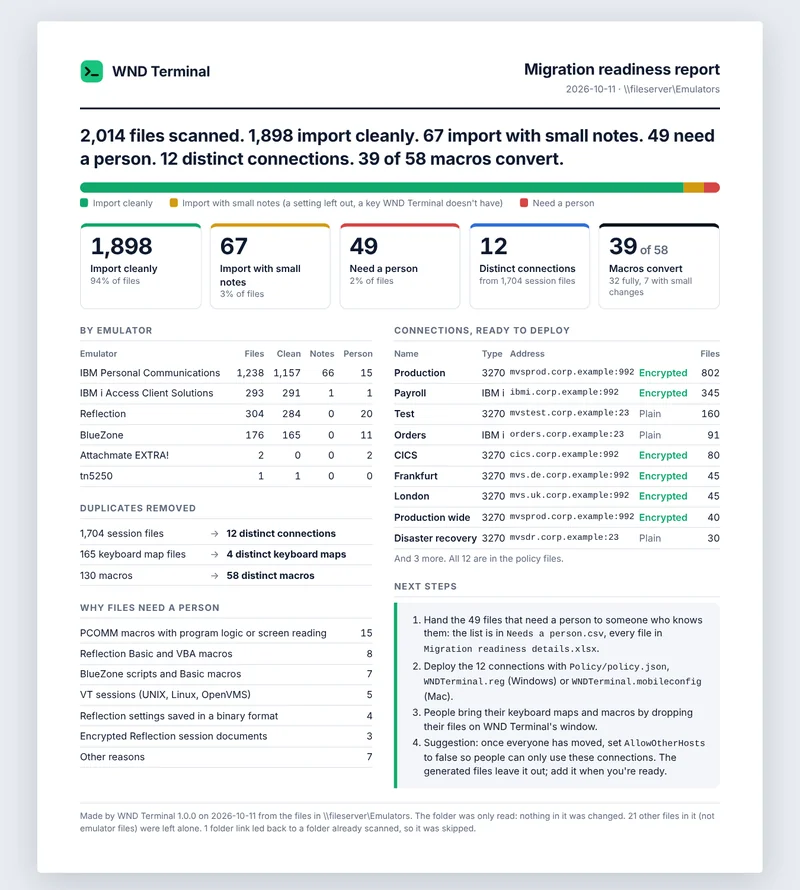
Point WND Terminal at the share full of PCOMM, Reflection, BlueZone, ACS, Extra!, PowerTerm and other emulators’ files. It reads every one, sorts each into “imports cleanly,” “imports with small notes” or “needs a person,” removes duplicates, converts PCOMM macros where it can, checks every Basic, VBA and PSL macro line by line, and writes a one-page report for the CIO, a detail workbook and the distinct connections as a policy ready to deploy with Group Policy, Intune or a Mac configuration profile.
- Read-only: it changes nothing in the folder
- Runs on your machine; nothing is sent to WND Software
- Every proof of value starts with it
Replace several Rocket products at once
Reflection, BlueZone, Rumba and Extra! are all Rocket Software products today. If more than one of them is on your desktops, WND Terminal can replace all of them, for mainframe, IBM i and UNIX users, under the same policy. The Migration readiness report reads Reflection, BlueZone and Extra! files from the same share, removes duplicates across products, and writes one set of connections. Rumba profiles come across through Reflection Desktop, and the report explains how.
Considering Rocket’s current product? Compare Secure Host Access with WND Terminal, including tiers, pricing assumptions and a renewal plan.
Replacing a web-access or transformation project?
IBM HATS: compare screen APIs and user interfaces →
Host On-Demand and HACloud: compare the browser-access path →
Inventory custom pages, service callers, sign-on and macros before agreeing a migration. The renewal planner gives that work a dated sequence.
WND Terminal, Reflection, BlueZone, PCOMM and ACS
Planning a move? Choose the migration guide for BlueZone, PCOMM, Extra! or Rumba.
Every WND Terminal entry comes from its documentation. We show our gaps (BlueZone scripts, OHIO) because desktop engineers check them on day one, and the readiness report finds every file that depends on one before anyone commits.
On a small screen, swipe the table to read all columns.
| Capability | WND Terminal | IBM PCOMM | Reflection Desktop (Rocket) | BlueZone (Rocket) | IBM i Access Client Solutions |
|---|---|---|---|---|---|
| IBM Z mainframe (3270, TN3270E) | Yes | Yes | Yes | Yes | Not found in public documentation |
| IBM i (5250) display | Yes | Yes | Yes | Yes | Yes |
| Printer sessions (3287 and IBM i) | Yes | Yes | Yes | Yes | Yes |
| IND$FILE file transfer | Yes1 | Yes | Yes | Yes | Not found in public documentation |
| VT and UNIX sessions | Yes | Yes | Yes | Yes | Not found in public documentation |
| Windows | Yes | Yes | Yes | Yes | Yes2 |
| Mac | Yes | Not found in public documentation | Not found in public documentation | Not found in public documentation | Yes2 |
| Linux | Yes | Not found in public documentation | Not found in public documentation | Not found in public documentation | Yes2 |
| Browser access | Yes | Yes3 | Yes4 | Yes5 | Not found in public documentation |
| Imports other emulators’ session and keyboard files | Yes | Not found in public documentation | Yes6 | Yes7 | Yes8 |
| Estate-wide migration report with a deployable policy | Yes | Not found in public documentation | Not found in public documentation | Not found in public documentation | Not found in public documentation |
| Central lockdown of user settings (Group Policy or MDM) | Yes | Yes | Yes | Yes | Yes9 |
| Screen history | Yes | Yes10 | Yes | Yes | Yes |
| Recent typing and autocomplete | Yes | Not found in public documentation | Yes | Not found in public documentation | Not found in public documentation |
| Card-number and pattern masking | Yes | Yes | Yes | Yes11 | Not found in public documentation |
| Audit log to Splunk or CEF/syslog | Yes | Not found in public documentation | Not found in public documentation | Not found in public documentation | Not found in public documentation |
| Tamper-evident session recording | Yes | Not found in public documentation | Not found in public documentation | Not found in public documentation | Not found in public documentation |
| Response-time monitoring | Yes | Yes12 | Not found in public documentation | Not found in public documentation | Not found in public documentation |
| AI that explains the screen | Yes | Not found in public documentation | Not found in public documentation | Not found in public documentation | Not found in public documentation |
| AI that works the session for you | Yes | Not found in public documentation | Not found in public documentation | Not found in public documentation | Not found in public documentation |
| Terminal access from ChatGPT or Claude (MCP) | Yes | Not found in public documentation | Not found in public documentation | Not found in public documentation | Not found in public documentation |
| Error and abend hints on screen | Yes | Not found in public documentation | Not found in public documentation | Not found in public documentation | Not found in public documentation |
| Modern view of live host screens | Yes | Yes13 | Yes14 | Not found in public documentation | Not found in public documentation |
| Fill screens from Excel and capture multi-page lists, no scripting | Yes | Not found in public documentation | Not found in public documentation | Not found in public documentation | Not found in public documentation |
| Guided learning and operator onboarding on live screens | Yes | Not found in public documentation | Not found in public documentation | Not found in public documentation | Not found in public documentation |
| One-click help-desk ticket | Yes | Not found in public documentation | Not found in public documentation | Not found in public documentation | Not found in public documentation |
| License usage reporting | Yes | Yes15 | Yes16 | Yes17 | Not found in public documentation |
| Smart card (CAC/PIV) sign-in | Yes18 | Not found in public documentation | Yes | Yes | Not found in public documentation |
| VBA or Basic macros | Yes19 | Not found in public documentation | Yes | Yes | Not found in public documentation |
| Response times to OpenTelemetry | Yes | Not found in public documentation | Not found in public documentation | Not found in public documentation | Not found in public documentation |
| Fleet discovery and first-run import | Yes | Not found in public documentation | Not found in public documentation | Not found in public documentation | Not found in public documentation |
| Print routing to folder, email and PDF | Yes | Not found in public documentation | Not found in public documentation | Not found in public documentation | Not found in public documentation |
| Session handoff between windows of one sign-in (browser) | Yes | Not found in public documentation | Not found in public documentation | Not found in public documentation | Not found in public documentation |
| Help desk joins a live session with consent (browser) | Yes | Not found in public documentation | Not found in public documentation | Not found in public documentation | Not found in public documentation |
| Screen translation | Yes20 | Not found in public documentation | Not found in public documentation | Not found in public documentation | Not found in public documentation |
| VS Code extension | Yes | Not found in public documentation | Not found in public documentation | Not found in public documentation | Not found in public documentation |
| Published VPAT | Yes | Not found in public documentation | Not found in public documentation | Not found in public documentation | Not found in public documentation |
| 3270 double-byte (DBCS) code pages | Yes | Yes | Yes | Yes | Not found in public documentation |
| Terminal screen translation with deployable language packs | Yes | ||||
| Screen Access: restrict host applications, screens and field values by role | Yes | ||||
| Real User Monitoring in Gateway: operator wait and host response | Yes | ||||
| Ask WND lookups from approved external MCP tools | Yes | ||||
| AI answers with citations from company runbooks | Yes |
- DFT mode. CUT mode isn’t supported.
- Java app, not native.
- Through IBM Host On-Demand, sold separately.
- Through Rocket Secure Host Access Anywhere, sold separately.
- Through Rocket Terminal Emulator Web Edition, sold separately.
- PCOMM and Rumba session files.
- Through its Migration Toolkit.
- PCOMM files only.
- Turns features off but doesn’t lock settings.
- VT sessions only.
- Card numbers only.
- TN3270E response time monitor only, no reports.
- Through IBM HATS, sold separately.
- Plus edition. Adds controls to the host screen.
- Through IBM License Manager Server.
- Through Rocket’s separate management server (MSS).
- Through BlueZone License Manager.
- Desktop app.
- Extra! Basic, Reflection Basic and VBA, HostExplorer Basic and PowerTerm PSL, run by WND Terminal’s own engine. Rumba macros are converted to WND Terminal macros and run. BlueZone scripts aren’t run.
- In Modern view. From your glossary first, and an AI model when IT allows it.
Checks come from each vendor’s publicly available documentation, as of October 2026. A blank cell means we found no public documentation for that feature. Products change, so check with the vendor to confirm before you decide. The vendor pages behind the checks include PCOMM data masking, PCOMM Group Policy templates, PCOMM VT emulation, Reflection Desktop masking, Reflection Desktop lockdown, Reflection Desktop features, BlueZone PCI settings, BlueZone feature locking, ACS Getting Started, PCOMM VT history logging, Reflection productivity tools (screen history, recent typing, auto complete), BlueZone screen history and ACS screen history archiving.
Reflection, BlueZone, Rumba and Extra! are trademarks of Rocket Software. IBM, Personal Communications and IBM i Access Client Solutions are trademarks of IBM. WND Software is not affiliated with or endorsed by these companies.
What customers changed when they switched
From WND Terminal’s published customer stories. The stories don’t name the previous vendor.
- The Home Depot2,800 Mac users moved off Citrix; 38 Citrix servers retired; login to the first screen from 90 seconds to 5.
- Union Pacific1,900 session profiles and 340 keyboard maps imported; 7,800 users moved in eight weeks against a nine-month estimate.
- Texas HHSCAbout 60,000 hours of retyping removed a year with Copy as table; QA keying errors from 4.1% to 0.3%.
- Nationwide40% fewer mainframe service-desk tickets with Explain this screen, on a model Nationwide hosts.
Built around your renewal date
Never pay twice
Cutover is timed to your current renewal. Keep your existing support current until the day you move, then give notice inside your contract’s window.
License position check
Included with every proof of value. We help inventory installs and document actual use so you can leave cleanly, without audit exposure.
Side by side first
A real team runs WND Terminal next to your current emulator for weeks, against success criteria you set, before anyone signs. If teams need different screens from one host menu, try the Screen Access walkthrough.
Questions IT teams ask
Do we need to change anything on the mainframe or IBM i?
No. WND Terminal connects with the standard TN3270E and TN5250 protocols your hosts already serve. There is no host software to install.
Will our users notice the change?
That’s what the proof of value is for. Sessions and keymaps are imported, defaults match familiar emulators, and your team works with it for weeks before you decide.
Do people keep screen history and autocomplete?
Yes. WND Terminal keeps the last 100 screens of each session (Ctrl+K, then Screen history) and a list of recent typing to send again. In a field someone has used before, it suggests the last entry, and Ctrl+Space types it. Passwords are never kept. How it works.
What if a screen looks different?
Open the same screen in both emulators. If yours displays it correctly and ours doesn’t, it’s our bug. The built-in flight recorder captures the data stream so we can find and fix it fast.
What happens to our macros and scripts?
Extra! Basic, Reflection Basic and VBA, HostExplorer Basic and PowerTerm PSL macros run in WND Terminal as they are, and any line it can’t run is listed with its line number. PCOMM .mac macros convert where they can. Rumba text macros and scripts convert to WND Terminal macros. BlueZone scripts and other scripted macros are counted and listed for a person in the Migration readiness report, so you know the size of it before you start.
Do our EHLLAPI and COM programs still work?
Yes. WND Terminal comes with EHLLAPI DLLs under the names programs load, COM objects with the Extra!, PCOMM and Reflection object models, and a .NET library for UiPath and Power Automate. IT turns them on at install, and they never replace another vendor’s files.
Does any traffic go through your cloud?
Never. The desktop app, or your own gateway, talks directly to your host inside your network. Licensing is checked locally from a signed file.
What about our current vendor’s license terms?
Read your agreement and talk to your procurement team. We’ll help you document what you have installed and actually use, so the conversation at renewal is based on facts.
More comparisons
Facing a renewal in the next 12 months?
That’s the right time to run a proof of value. Tell us your renewal date and we’ll plan backwards from it.
Compare your options
Reflection alternatives for mainframe access · IBM MQ troubleshooting reference