Send to help desk
When a screen goes wrong, one click turns it into a ticket with everything the help desk needs, so it never comes back with “send us a screenshot” or “which system?”
Included in every plan. See pricing
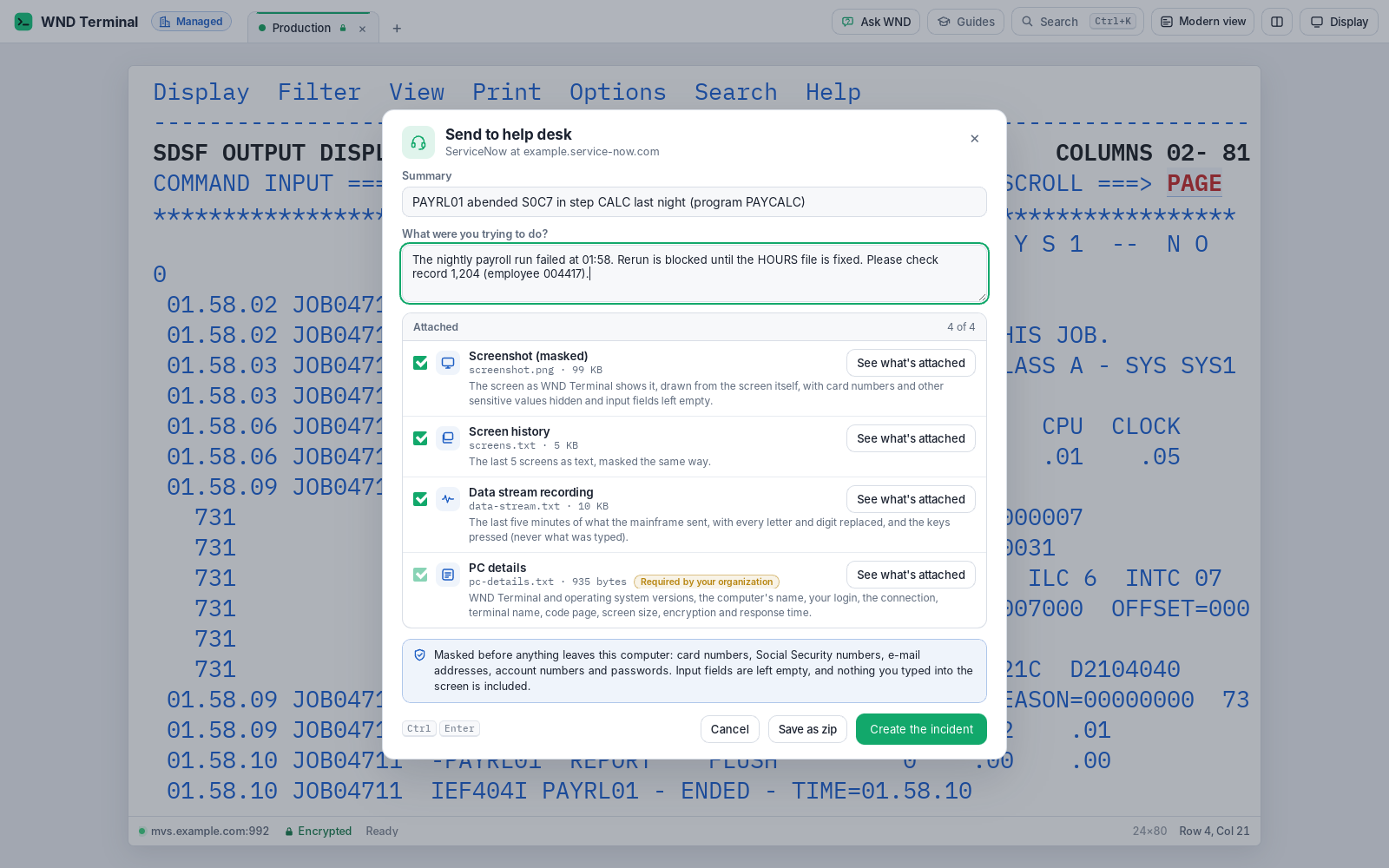
Send to help desk is a WND Terminal feature that creates a help-desk ticket from the screen in front of the person, in one click. The ticket carries a masked screenshot drawn from the screen itself, the AI explanation, the last few screens as masked text, a masked recording of the last five minutes of the data stream, and the PC and connection details. It goes to ServiceNow, Jira (Cloud or Data Center) or e-mail, as IT chooses.
The problem
Half our mainframe tickets start with three e-mails: which system, which screen, what were you doing. The other half have a phone photo of a monitor.
We can’t let people paste screens into tickets. They’re full of account numbers.
How it works
Click Send to help desk
It’s next to the answer in Explain this screen, in the right-click menu and the command palette, and on Ctrl+Shift+H (⌘⇧H).
Check the ticket
A short dialog shows a summary, a box for what the person was trying to do, and the attachments, each with a tick box and “See what’s attached.”
Send
The ticket is created in ServiceNow or Jira, or sent by e-mail. The dialog shows the number (“INC0012345 created”), puts it on the clipboard and offers to open it.
If IT hasn’t connected a help desk, the button is Copy for a ticket: the ticket’s text goes on the clipboard and the attachments into a zip, ready for any help-desk form.
What’s in the ticket
Screenshot (masked)
A PNG that WND Terminal draws from the screen itself, never a picture of the computer’s display. Card numbers, Social Security numbers, e-mail addresses, long account numbers and IT’s patterns are shaded out; input and hidden fields are drawn empty.
AI explanation
When there is one. It was made from masked text and is masked again.
Screen history
The last 5 screens as text (IT can set up to 20), masked the same way, with input fields empty.
Data stream recording
The last five minutes, replayable. On mainframe sessions every letter of screen text becomes X and every digit 9, while orders, attributes, colors and positions stay. On IBM i, records are listed by time and size only.
PC details
WND Terminal and OS versions, computer name, the login (only if IT allows), connection, host and port, terminal or device name, code page, screen size, encryption, the last response time, and where the policy came from.
Clear errors
A wrong address, a refused sign-in, a missing permission or no network are explained in plain English, with “Save as zip instead.”
Under IT’s control
Every capability in WND Terminal follows the same rules: IT decides, the audit log records it, and nothing is sent to WND Software.
Help-desk security details →- Masking IT controls. Masking applies whatever the person’s own setting is. IT can require attachments (
HelpDeskAlways) or never offer some (HelpDeskNever). - People see what goes. Every attachment can be opened before sending.
- Secrets stay out of the policy. The help-desk sign-in lives in Windows Credential Manager or the macOS Keychain.
- Least privilege. The admin guide lists the exact roles: for ServiceNow, create incidents and attachments; for Jira, Browse Projects, Create Issues and Create Attachments.
- E-mail is encrypted with STARTTLS; servers that don’t offer it are refused unless IT allows it for a trusted network.
- Audit log: one
helpdesk.ticketevent per ticket (where it went, the number, which kinds of attachment), never their contents.
Fewer tickets first, then better ones

Nationwide cut mainframe service-desk tickets from about 3,100 to about 1,850 a month by explaining mainframe messages on the user’s screen with Explain this screen, using a model hosted in its own network. That’s 15,000 fewer tickets a year, worth about $330,000 in service-desk time. Send to help desk handles the tickets that remain: they arrive complete, masked and routed on the first try.
Read the Nationwide story →Tested against the real APIs’ formats
WND’s tests send tickets to a stand-in ServiceNow, Jira and mail server written from their API documentation, and fail if anything received holds the password, the card number, the SSN or the person’s typing.
Send to help desk: questions
Which help desks does it work with?
ServiceNow (incidents, with attachments), Jira Cloud and Jira Data Center (issues, with attachments), and e-mail through your mail server or the person’s own mail program. Without one, Copy for a ticket works with any help-desk form.
Is the screenshot safe to attach?
Yes. WND Terminal draws it from the screen’s data, not from the computer’s display, with card numbers, SSNs, e-mail addresses, long account numbers and IT’s patterns masked, and input and password fields drawn empty.
What is the data stream recording for?
It lets support replay the last five minutes as the terminal received them, to diagnose display or application problems, with every letter and digit of screen text replaced so nothing can be read.
Where is the help-desk password kept?
In the computer’s credential store (Windows Credential Manager or the macOS Keychain), never in the policy.
Can IT decide what’s attached?
Yes. IT can require attachments, remove others from the list, and set how many screens the history includes (1 to 20, 5 by default).
Works well with
Fewer tickets, and better ones.
Connect a ServiceNow or Jira test instance during a proof of value and file your first complete ticket in one click.