Session recording for privileged users
Show auditors exactly what system programmers did on production: every screen and every key, masked, tamper-evident and kept in your own storage.
Included in the Enterprise plan. See pricing
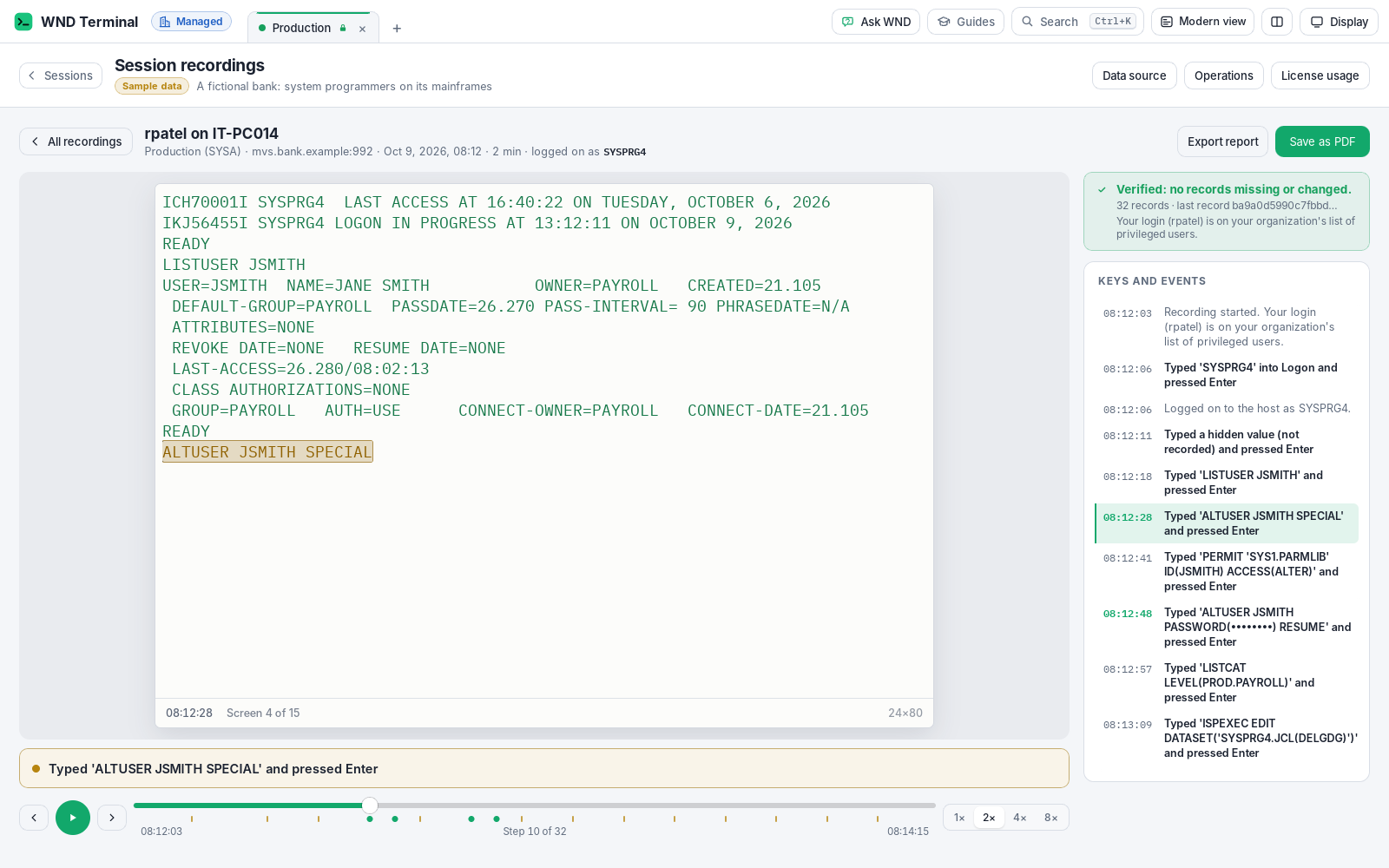
Session recording is a WND Terminal feature that records the mainframe (3270) and IBM i (5250) sessions of the people and connections IT chooses: every screen the host shows and every key sent, with what was typed. Passwords are never recorded, and card numbers and other sensitive values are masked before anything is written. Each recording is hash-chained and signed, stored in the customer’s own storage, and can be searched and replayed. It serves SOX, PCI DSS and DORA evidence requests without a separate privileged-access product or jump server.
The problem
The auditors asked what our system programmers did in production last quarter. We have SMF records and a RACF report. We don’t have what was on the screen.
Putting every sysprog behind a jump server just to record 3270 sessions is a project nobody wants.
How it works
IT decides who is recorded
RecordSessions is "privileged", "all" or "off" (the default). Privileged means the logins and groups in PrivilegedUsers, and connections, hosts and host logons such as logon:SYSPRG* in PrivilegedConnections.
The person is told
A recorded session shows a red “REC” on its tab and “Recorded by your organization’s policy” in the status line. People can’t turn it off.
WND Terminal records as they work
Every screen once the host’s writes settle, and every key with the fields sent and what was typed, each with the time. The file is written on the computer first and copied to your recording folder as it grows.
Auditors review
Ctrl+K > Session recordings, on any computer that can read the folder: find sessions, search every screen and key, replay, verify integrity and export a report.
Tamper-evident by design
One file per session
RecordingFolder\<login>@<COMPUTER>\<date>\<id>.wndrec: JSON lines in gzip members, only ever appended to.
Hash chain
Every record carries the SHA-256 of the record before it.
Signature
The last record sums up the recording and is signed with an Ed25519 key made for that recording alone; the private key exists only in memory while the session runs.
Anchored in your audit log
The public key goes into session.recording.start and the last record’s fingerprint into session.recording.stop. With the audit log in your SIEM, a re-signed copy can’t match.
Verified on replay
“Verified: no records missing or changed,” or a clear warning saying what’s missing or changed. A recording without its last record is reported as incomplete.
Open format
The .wndrec format is documented field by field, so your own tools can check a recording independently.
Search and replay, not a spreadsheet
Recorded
Every screen the host shows, every key that goes to the host with the fields sent and what was typed, and the user ID the person logged on to the host with.
Never recorded
Hidden (non-display) fields such as passwords. The recording says only that a hidden field was typed into.
Always masked first
Card numbers (all but the last four digits), passwords typed in commands (LOGON user/password, PASSWORD(...)), your MaskPatterns and RecordingMaskPatterns.
Search
Across every recorded screen and key (DELETE, RACF, ALTER, a data set name), with each hit shown in context.
Player
Screens as the terminal drew them, with a timeline and each key as a caption: “Typed ‘DELETE SYS1.X’ and pressed Enter.”
Export report
One self-contained web page with who, where, when, why, every key and screen and the integrity statement, which prints to PDF. Viewing and exporting are audited too.
Your storage, your retention
Every capability in WND Terminal follows the same rules: IT decides, the audit log records it, and nothing is sent to WND Software.
Session recording on the security page →- Your storage. Recordings go to
RecordingFolder, usually a share. Give everyone create-and-write permission and read access only to reviewers. - Your retention.
RecordingRetentionDaysdeletes only the recordings each computer wrote for its own person; leave it out to manage retention with your own tools. - Never slows the session. A writer thread keeps only rows that changed, skips repeated screens and compresses. A two-minute TSO session is a few kilobytes.
- Offline-safe. If the folder can’t be reached, the recording waits on the computer, readable only by the person’s account, and is copied when the folder is back.
- In the browser too. Sessions through the WND gateway are recorded the same way, with privileged users matched against the groups from sign-in.
- Nothing is sent to WND Software.
Customer-owned storage passes review faster

When Fifth Third Bank evaluated WND Terminal, the question was whether its data left the bank. WND’s usage data is written to a folder on the bank’s own share; session recordings follow the same model.
Read the Fifth Third story →It doesn’t. It’s a file on our share. That’s what got it through review in two weeks instead of two quarters.
Rob Kessler, VP, End-User Technology & Software Asset Management, Fifth Third Bank
Tested against tampering
WND’s tests record real sessions (a logon with a password, TSO commands, a screen with a card number), check that the replay shows the same screens with no password and no full card number, and check that the verifier catches records taken out, changed and moved.
Session recording: questions
Who gets recorded?
Only who IT chooses in the policy: logins and directory groups in PrivilegedUsers, connections and hosts in PrivilegedConnections, or host logons such as logon:SYSPRG*. RecordSessions can also be “all” or “off” (the default). People can’t turn it on or off themselves.
Are passwords recorded?
No. Hidden fields are never recorded, and passwords typed in commands (LOGON user/password, PASSWORD(...), PHRASE(...)) are masked before anything is written.
How do auditors know a recording wasn’t altered?
Every record carries the SHA-256 of the one before it, and the last record is signed with an Ed25519 key unique to that recording. The public key and the final fingerprint are also in the audit log. The player shows “Verified” or exactly what is missing or changed.
Where are recordings stored?
In your organization’s own storage, the folder set in RecordingFolder, usually a network share. Nothing is sent to WND Software.
Do we need a jump server or a privileged access management product?
Not to record 3270 and 5250 sessions. WND Terminal records them itself, on the desktop or through the browser gateway.
How big are recordings?
A few kilobytes per minute of work. Only changed rows are kept, repeated screens are skipped, and the file is compressed.
Works well with
Hand your auditors a replay, not a spreadsheet.
Turn on recording for one privileged group during a proof of value, then search and replay their sessions.