Capture all pages
A list that runs over 36 screens becomes one Excel table in one step.
Included in every plan. See pricing
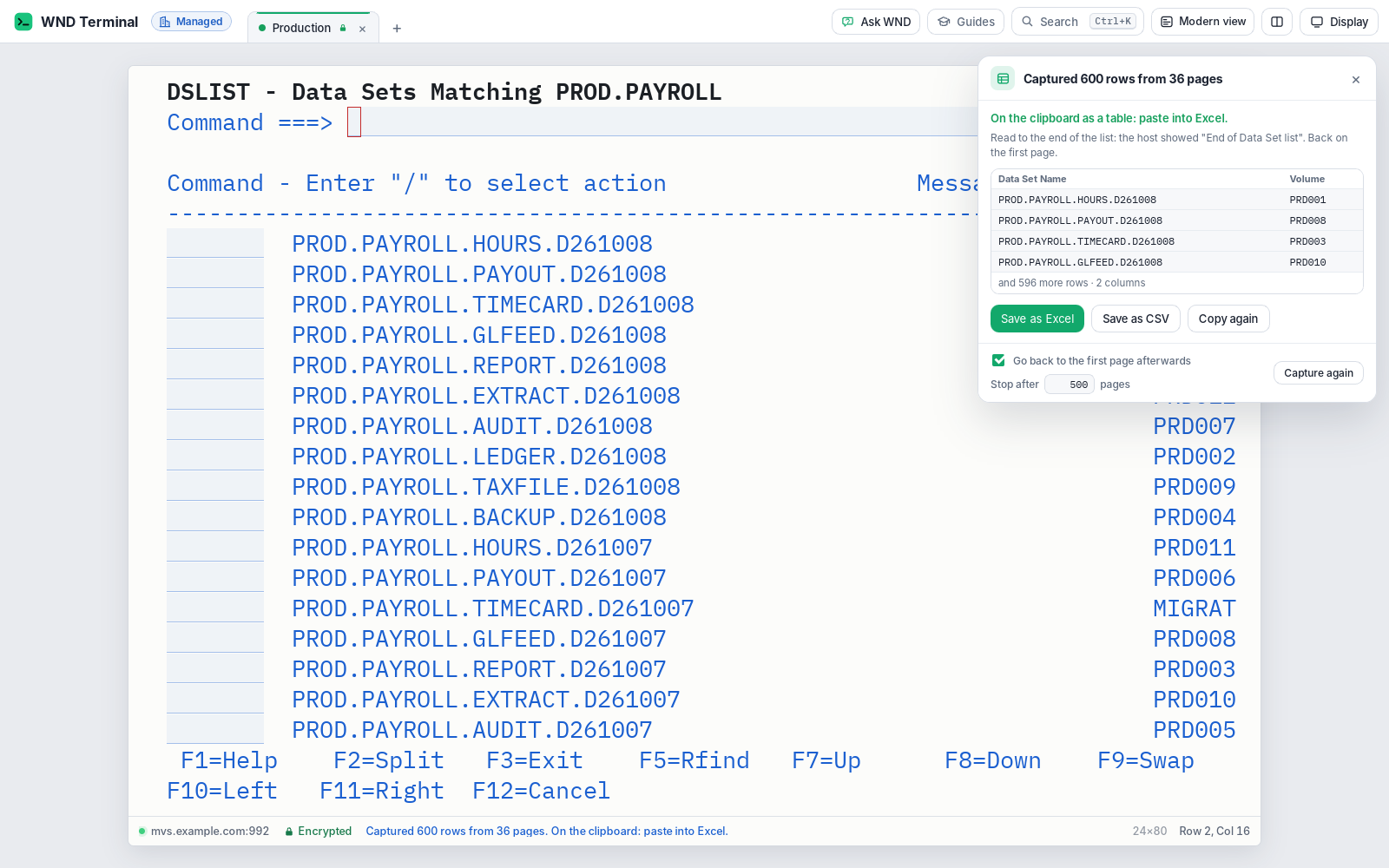
Capture all pages is a WND Terminal feature that pages through a multi-screen host list, such as an ISPF 3.4 data set list, an SDSF job list or an IBM i Work with Spooled Files list, and joins every page into one table. Repeated headings appear once and overlapping rows are removed. The table goes to the clipboard and can be saved as Excel or CSV.
The problem
I need the full data set list for an audit. It’s 600 rows. I press PF8, copy, paste, fix the columns, delete the headings, and do it again. Thirty-six times.
Every time we paste into Excel, the leading zeros on our codes disappear.
How it works
Open the list on the host
As you normally would: ISPF 3.4, SDSF ST, IBM i WRKSPLF.
Press Ctrl+Shift+A
(⌘⇧A on a Mac), or choose Capture all pages from the right-click menu or the command palette.
WND Terminal pages to the end
It presses PF8 (Page Down on IBM i), waits for the host each time, and keeps every page’s rows. It stops when the host marks the end, when “More...” goes away, or when the page stops changing.
Paste or save
The table is already on the clipboard for Excel. Save as Excel writes an .xlsx file; Save as CSV writes a CSV.
What it does
One table, clean
Headings that repeat on every page appear once. Rows a page shows again because pages overlap (SDSF scrolls by half a page) are removed. Command lines, messages and function-key lines are never part of the table.
Excel-ready files
A bold, frozen header, sized columns, numbers as numbers and codes such as 0042 kept as text, so leading zeros survive.
Clear status
The status line says what was captured: “Captured 600 rows from 36 pages.”
You stay in control
It starts from the page shown, stops after 500 pages by default (you can change it), and stops when you press Stop or Esc.
Back where you started
“Go back to the first page afterwards” presses PF7 as many times as it paged forward.
Mainframe and IBM i
ISPF and SDSF lists on z/OS; Work with Spooled Files and other lists on IBM i.
Single screens too
Copy as table (Ctrl+Shift+C) copies the list on the current screen as real Excel columns.
In the browser too
Saved files arrive as browser downloads.
Under IT’s control
Every capability in WND Terminal follows the same rules: IT decides, the audit log records it, and nothing is sent to WND Software.
How masking works →- Masking holds. Hidden fields and values hidden by privacy settings (card numbers, IT’s patterns) stay hidden in the table and the files.
- IT can turn it off. When the policy turns copying off (
AllowCopy= false), capturing and saving are off too. - Audit log: one event per capture, with the row and page counts, and one per file saved. Never the screen’s contents.
Getting data out of the green screen, proven

With WND Terminal’s Copy as table, about 2,400 staff make about 48,000 copies a month, at an estimated 6 minutes saved each. Keying errors in QA spreadsheets fell from 4.1% to 0.3%, and a 40-row QA review sheet went from about 25 minutes to about 3. Capture all pages does the same for lists that run over many screens.
Read the Texas HHSC story →The trial group started forwarding each other screenshots of Excel.
Angela Ruiz, Director, Program Support Systems, Texas HHSC
Tested on real lists
600 data sets from an ISPF 3.4 list (36 pages), 150 SDSF jobs with overlapping pages, and 250 IBM i spooled files, with the clipboard and the saved files read back.
Capture all pages: questions
Which lists can Capture all pages read?
Any list WND Terminal finds on the screen, including ISPF 3.4 data set lists, SDSF job lists and IBM i Work with Spooled Files lists. It finds the columns from the screen’s layout.
How does it know when to stop?
It stops when the host marks the end of the list, says so in a message, removes “More...”, stops changing the page, or locks the keyboard with an error. It also stops after 500 pages by default, or when you press Stop or Esc.
Does it keep leading zeros?
Yes. Codes such as 0042 are saved as text in the .xlsx file, and numbers are saved as numbers.
What about SDSF, which scrolls by half a page?
Rows that appear again because pages overlap are left out, so each row appears once.
Can we stop people exporting data?
Yes. If IT turns copying off in the policy, capturing and saving are off too. Every capture and every saved file is recorded in the audit log, without the screen’s contents.
Works well with
Pick your longest list.
In a proof of value, we capture it on your own system and hand you the spreadsheet.