Terminal emulation for the hosts you use.
3270 for IBM Z, 5250 for IBM i, VT for UNIX/Linux, T27 and UTS for Unisys, HP 700/92 for HP 3000, 6530 for HPE NonStop, and ALC for airline systems. Check your exact model and connection.
1,900 session profiles and 340 keyboard maps imported. Union Pacific moved 7,800 users in eight weeks against a nine-month estimate. Read the story →
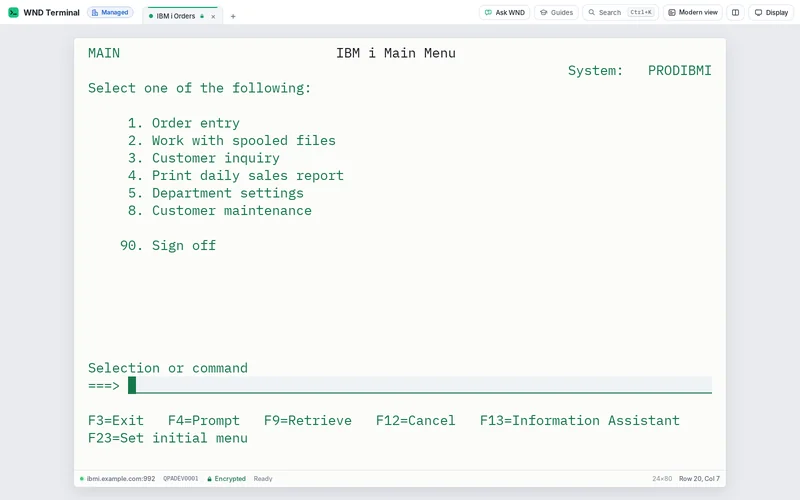
Find your system in WND Terminal
Use WND Terminal with IBM Z, IBM i, UNIX and Linux, Unisys, HP 3000, HPE NonStop, and airline ALC hosts. Find your system and connection options below.
On a small screen, swipe the table to read all columns.
| System | Terminal | Connection | Where it runs | Current scope | Release |
|---|---|---|---|---|---|
| IBM Z and mainframe | 3270, TN3270E | Telnet, TLS | Windows, Mac, Linux, browser gateway | Display and host sessions for IBM mainframe applications. | v1.0.299 |
| IBM i and AS/400 | 5250 | Telnet, TLS | Windows, Mac, Linux, browser gateway | Display and host sessions for IBM i applications. | v1.0.299 |
| UNIX, Linux and VT applications | VT100, VT220, VT320, xterm-compatible | SSH, Telnet | Windows, Mac, Linux, browser gateway | Character sessions with VT keys, colors and scrollback. | v1.0.299 |
| Unisys ClearPath MCP T27 | T27, TD830 family | Telnet | Windows, Mac, Linux | Forms, XMIT/SPCFY, configurable F/SF keys and page memory in T27 Telnet sessions. | v1.0.319 |
| Unisys ClearPath OS 2200 UTS 60 | UTS 60 | Telnet | Windows, Mac, Linux | Formatted fields, XMIT, function keys, message waiting and conventional tab navigation over Telnet. | v1.0.319 |
| HP 3000 HP terminal emulation | HP 700/92, HP 2392A | Telnet | Windows, Mac, Linux | Character and block forms, host-defined f1–f8 keys and basic identity/status behavior for HP 700/92 and 2392A. | v1.0.319 |
| HPE NonStop 6530 | 6530 | Telnet | Windows, Mac, Linux | Conversational and block-mode 6530 sessions with function keys, common page behavior and status responses. | v1.0.319 |
| Airline ALC host access | P1024B ALC | MATIP type A | Windows, Mac, Linux | P1024B ALC reservation sessions over MATIP type A, with separate software-only device workflow examples. | v1.0.319 |
Additional model-specific profiles
DEC VT52 · DEC VT102 · DEC VT420 partial profile · DEC VT520 partial profile · Wyse WY-50, WY-50+ and WY-60 · IBM 3151 ASCII Display Station · BBS ANSI with DOS CP437 · SCO ANSI · AT386 partial profile · HP 700/94 partial profile
WND Terminal has native desktop apps and a browser gateway for supported profiles. Use the supported-systems index and this checklist to verify the host, terminal model, keyboard, printing, transfer and application workflow.
- Hosts
- IBM mainframes, IBM i, UNIX/Linux, Unisys, HP 3000, HPE NonStop and airline hosts.
- Compatibility
- Session imports, existing macros and automation interfaces.
- Operations
- Printing, transfers, policy and diagnostic evidence.
Check the details before you switch
On a small screen, swipe the table to read all columns.
| What you need | What WND Terminal provides |
|---|---|
| 3270 | TN3270E, supported screen models and dynamic sizes, PF/PA keys, light pen and APL. 3270 guide. |
| 5250 | IBM i display, printing, enhanced controls and supported DBCS workflows. IBM i support. |
| VT / SSH | UNIX and Linux sessions, SSH identity/host-key handling and Telnet. VT sessions. |
| Unisys T27 / UTS | Separate T27 and UTS 60 profiles for ClearPath MCP and OS 2200 applications. Unisys guide. |
| HP 3000 | HP 700/92 and HP 2392A profiles for MPE applications. HP 3000 guide. |
| HPE NonStop 6530 | 6530 conversational and block-mode sessions. NonStop guide. |
| Airline ALC | P1024B ALC sessions over MATIP type A. Airline guide. |
| Keyboard and sessions | Import existing sessions and keyboard maps; review the readiness report for anything that needs a person. Readiness report. |
| Legacy macros | Extra!, Reflection, HostExplorer and PowerTerm languages, with unsupported lines reported. Compatibility details. |
| Program interfaces | EHLLAPI DLLs, COM objects and .NET interfaces for existing programs. EHLLAPI and COM. |
| Printing | Host print sessions and policy-controlled routing. All feature details. |
| File transfer | FTP, FTPS and SFTP, with the supported host-specific data-set and file workflows. Transfer guide. |
| Languages | Supported DBCS and Arabic, Hebrew and Thai host workflows. DBCS · Bidirectional text. |
| Network and TLS | Proxy and negotiated TLS options, plus sign-on integration. Proxies · Sign-on. |
| Reference and help | Offline code hints and the 464-code reference. Model-based Explain and Ask are separate. |
| More terminal models | Supported systems also lists Wyse, IBM 3151, additional VT models and other released profiles. Confirm your exact host during the proof of value. |
Test the workflows that matter
Start with your actual session folders, macros, printing and programs that drive the emulator. Imports and protocol support do not prove an application workflow on their own. Run side by side on your hosts and record what passed, what needs a small change and what needs a person.
Plan the switch · Compare Reflection · Compare PCOMM · Compare BlueZone · Compare IBM i ACS. The comparison pages carry their sources and platform qualifications.
1,900 profiles at Union Pacific
Union Pacific imported 1,900 session profiles and 340 keyboard maps and moved 7,800 users in eight weeks, against a nine-month estimate to rebuild them by hand.
Read Union Pacific’s storyHow it is licensed
Desktop and Enterprise remain $69 and $75 per user per year, with a 100-user minimum. Additional products have their own entitlements. For fewer users or a mixed deployment, contact WND Software rather than assuming an unlisted plan.
Talk through your deployment or see Desktop and Enterprise pricing.
The emulator underneath
The capabilities customers switched for in the first place.
Copy as table
Select any screen region and paste it into Excel with the columns intact and leading zeros kept. Field-aware copy and paste everywhere else.
License usage dashboard
Who used WND Terminal in the last 30, 60 and 90 days, by person and department. Runs inside your network, so you right-size seats on facts.
One-click import
Drag in session and keymap files from PCOMM, Reflection, BlueZone, IBM i Access Client Solutions or tn5250. Extra!, PASSPORT, PowerTerm, HostExplorer, TN3270 Plus, QWS3270, Vista tn3270 and PuTTY sessions import too, and Rumba profiles through Reflection Desktop. What comes across
Keyboard fidelity
PF1–PF24, PA1–PA3, Clear, Reset, Attn, SysReq, Field Exit and Field+/−. A keymap editor with presets that mirror familiar emulators.
Workspace
Tabbed sessions, split panes, a Ctrl+K command palette, crisp scalable fonts, dark mode, hotspots and a clear status line.
Printing and file transfer
TN3270E printer sessions and IBM i printers to any printer or PDF, print-screen with headers and footers, IND$FILE transfers, and an FTP, FTPS and SFTP client for z/OS data sets, JES jobs and IBM i libraries.
Screen history and autocomplete
Go back through the last 100 screens of a session with Ctrl+K, send recent typing again, and press Ctrl+Space to accept a suggestion. Passwords are never kept. How it works
Central configuration
Set connections, keymaps and rules once with Group Policy (ADMX), Intune, a Mac configuration profile or policy.json. The engine enforces locked settings.
Encryption
TLS 1.2 or later through the operating system’s own TLS: SChannel on Windows and Apple’s Security framework on macOS, both FIPS 140 validated. Client certificates and smart cards from the Windows certificate store or macOS Keychain. TLS can be negotiated on the host’s telnet port, and runs end to end through a proxy.
Flight recorder
Capture the data stream with screen contents redacted by default, then replay it to pinpoint any display issue.
Backup hosts
If the main host stops answering, sessions move to a backup address by themselves and say so in the status line.
Accessibility
Works from the keyboard, with screen readers through the system’s accessibility interface, with large text and high-contrast screen colors. Checked against WCAG 2.1 AA on every change. Accessibility and the VPAT 2.5
Macros
Record a routine or write one. Macros read the screen, decide with if, repeat steps, ask questions and save rows to a CSV file. Extra!, Reflection, HostExplorer and PowerTerm macros run as they are. How they work
Automation API
Scripts and programs on the same PC drive open sessions with EHLLAPI-style keys, and EHLLAPI, COM and .NET programs written for other emulators keep working. Password fields always read as blanks, and IT can turn it off. How it works
Sign-on without a password
Kerberos signs people on to IBM i with their computer sign-in. Express Logon logs them on to z/OS with a certificate. In a browser, the gateway uses RACF PassTickets. How it works
Windows, Mac, Linux, the browser and phones, under the same policy and license
Windows
- MSI for IT, installed silently with Intune, Configuration Manager or Group Policy
- Per-user setup.exe that needs no administrator rights
- Group Policy ADMX and ADML templates
- Physical desktops, Citrix and Azure Virtual Desktop
Mac
- One native app for Apple Silicon and Intel, macOS 11 or later
- MacBook key mappings for Field Exit, Roll Up and Down, Attention and Reset
- Deployed with a configuration profile through Jamf, Intune, Kandji or Mosyle
- The Home Depot moved 2,800 Mac users off Citrix and retired 38 Citrix servers
Browser
- Chrome and Edge 105+, Firefox 115+, Safari 15+
- A gateway on your own Linux or Windows server, or Docker
- Sign-in with Entra ID, Okta, Google or any OpenID Connect provider
- One seat per person, browser and desktop together
Linux
.deb,.rpmand AppImage, for x64 and arm64- Tested on Ubuntu 22.04 and 24.04 and Debian 12
- The same policy in
/etc/wnd-terminal/policy.json - Wayland, X11 and virtual desktops
Phones and tablets
- iPhone, iPad and Android through your gateway
- A key bar with Enter, PF1–PF24 and the PA keys
- Tap to type, pinch to zoom
- Barcode scanning into the field at the cursor
Questions
Can our existing macros run unchanged?
WND Terminal supports several legacy macro languages and reports unsupported lines. Use the readiness report and test the actual macros your workflows use.
Do we need to replace the host application?
No. WND Terminal uses the existing host protocols and screens. Validate the connection, workflow and any platform-specific requirements.
Is a code hint the same as AI Explain?
No. Offline hints use the built-in reference. Explain this screen and Ask WND use a model chosen by IT.
How should we prove compatibility?
Use the readiness report first, then a team trial or proof of value on your own hosts with the real keys, macros, printing and connected programs.
Prove it with your sessions and macros.
Import your real configuration, keep familiar keys and run the workflows your users depend on. Start the team trial or plan a free proof of value before renewal.