A PowerTerm alternative before support ends on June 30, 2027
Ericom stopped selling PowerTerm in March 2025 and stops supporting it on June 30, 2027. WND Terminal takes over your 3270 and 5250 sessions, and this page shows how to move in 30 days.
WND Terminal includes every feature for at most $75 per user per year, with a 100-user minimum. A proof of value takes two to four weeks. Compare your current vendor quote and migration work in the savings calculator. Review updated .
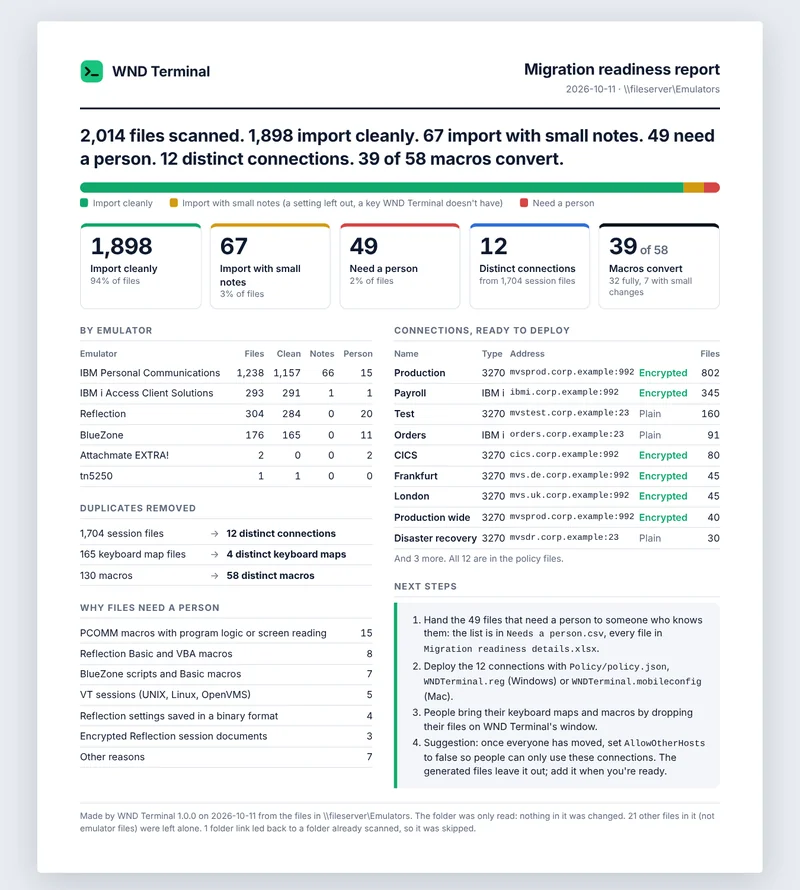
WND Terminal is a PowerTerm alternative for IBM mainframe (3270) and IBM i (5250) sessions, on Windows, natively on Mac, and in a browser through a gateway you host. It reads PowerTerm’s setup files (.pts, .ptc) for the host, port, LU or device name and encryption, so your 3270, 5250 and VT sessions come across well before Ericom ends PowerTerm support on June 30, 2027. PSL scripts run as they are.
PowerTerm end of life, in Ericom’s words
Ericom published one notice for every PowerTerm product. These are its dates and terms.
- March 2025
- End of sale. Ericom stopped accepting orders from new customers for PowerTerm licenses and subscriptions.
- Until June 2027
- Existing customers can renew support only on a reduced support basis. No renewal runs past June 30, 2027.
- June 30, 2027
- End of support. After this date Ericom provides no support services for any PowerTerm product.
- After that
- The notice doesn’t change your right to use PowerTerm under its license. You can keep running it, but nobody at Ericom will answer when something breaks.
From Ericom’s end-of-life announcement, which covers every PowerTerm product that wasn’t already retired. It doesn’t name a replacement or a migration path. Ericom itself has been part of Cradlepoint, an Ericsson company, since April 2023.
At a glance
WND Terminal facts come from its documentation. PowerTerm facts come from Ericom. A check means the feature is in that product’s public documentation.
On a small screen, swipe the table to read all columns.
| Capability | WND Terminal | PowerTerm (Ericom) |
|---|---|---|
| Sold to new customers | Yes | Not found in public documentation1 |
| IBM Z mainframe (3270, TN3270E) | Yes | Yes |
| IBM i (5250) display | Yes | Yes |
| VT and selected Wyse/ANSI terminal types | Yes2 | Yes |
| Windows | Yes | Yes |
| Mac | Yes | Yes3 |
| Browser access | Yes | Yes4 |
| Reads PowerTerm setup files | Yes | Yes |
| Reads PCOMM, Reflection, BlueZone and ACS files | Yes | Not found in public documentation |
| PowerTerm Script Language and VBA | Yes5 | Yes |
| TLS 1.2 or later to the host | Yes | Yes6 |
| Screen history | Yes | Yes7 |
| Recent typing and autocomplete | Yes | Not found in public documentation |
| AI that explains the screen | Yes | Not found in public documentation |
| AI that works the session for you | Yes | Not found in public documentation |
| Terminal access from ChatGPT or Claude (MCP) | Yes | Not found in public documentation |
| Error and abend hints on screen | Yes | Not found in public documentation |
| Card-number and pattern masking | Yes | Not found in public documentation |
| Audit log to Splunk or CEF/syslog | Yes | Not found in public documentation |
| Response times to OpenTelemetry | Yes | Not found in public documentation |
| Fleet discovery and first-run import | Yes | Not found in public documentation |
| Print routing to folder, email and PDF | Yes | Not found in public documentation |
| Session handoff between windows of one sign-in (browser) | Yes | Not found in public documentation |
| Help desk joins a live session with consent (browser) | Yes | Not found in public documentation |
| Screen translation | Yes8 | Not found in public documentation |
| VS Code extension | Yes | Not found in public documentation |
| Published VPAT | Yes | Not found in public documentation |
| Price published on the website | Yes | Not found in public documentation |
| Terminal screen translation with deployable language packs | Yes | |
| Screen Access: restrict host applications, screens and field values by role | Yes | |
| Real User Monitoring in Gateway: operator wait and host response | Yes | |
| Guided learning and operator onboarding on live screens | Yes | |
| Modern view of live host screens | Yes | |
| Ask WND lookups from approved external MCP tools | Yes | |
| AI answers with citations from company runbooks | Yes |
- Withdrawn from sale in March 2025. Support ends June 30, 2027.
- VT100, VT220 and VT320, HP 700/92 and Tandem 6530, plus scoped VT52, VT102, VT420, VT520, Wyse and ANSI profiles. Data General and Siemens remain outside current coverage.
- InterConnect Mac edition, withdrawn.
- WebConnect HostView, withdrawn.
- PSL scripts run as they are. VBA macros need a person.
- Up to TLS 1.2.
- VT and other non-IBM sessions only.
- In Modern view. From your glossary first, and an AI model when IT allows it.
Checks come from each vendor’s publicly available documentation, as of October 2026. A blank cell means we found no public documentation for that feature. Products change, so check with the vendor to confirm before you decide. The vendor pages behind the checks include the PowerTerm InterConnect data sheet and the PowerTerm Pro user’s guide.
PowerTerm facts come from Ericom’s own pages, listed at the foot of this page.
What moves, and what needs a person
Connections, keyboard layouts and PSL scripts are the quick part. Wyse and ANSI sessions need a screen-and-key proof of value; VBA macros need separate mapping. Data General and Siemens need a separate product decision.
On a small screen, swipe the table to read all columns.
| In PowerTerm today | In WND Terminal | Who does the work |
|---|---|---|
| 3270 connections (host, port, TLS, LU name, screen model) | Imported from .pts and .ptc setup files, then deployed in IT’s policy with Group Policy, Intune, a Mac configuration profile or policy.json. Users can’t change IT’s connections | The import or the readiness report. You check them |
| 5250 connections (host, device name, screen size) | IBM i connections in the same policy | Imported the same way, from the .pts file that names the terminal type |
| Backup host addresses | Each connection lists backup addresses, tried in order when connecting and reconnecting | Check them after the import, and add any that are missing |
| Custom keyboard layouts | Keyboard files (.ptk) stored as text are read, and functions WND Terminal doesn’t have are listed. Others are made again as WND Terminal keyboard maps | A person, for files that aren’t text |
| IND$FILE file transfer | Supported in DFT mode. CUT mode is not supported | Check the transfer settings PowerTerm keeps in ptdef.pts, then test a real transfer |
| 3287 and IBM i printer sessions | Supported, with host print transform for IBM i | Set up with the display connections |
PSL scripts (.psl) | Run as they are, in WND Terminal’s own engine. Lines it can’t run are listed with their line numbers | The import or the readiness report. A person, for the listed lines |
| VBA macros, and scripts recorded in VBScript or JScript | Not run | Needs a person |
| Programs that drive PowerTerm through an API | EHLLAPI programs keep working through WND Terminal’s EHLLAPI DLLs. Programs written for PowerTerm’s own objects move to the automation API | IT turns the DLLs on at install. A person, for PowerTerm’s own objects |
| VT, HP and Tandem sessions | VT100 to VT320 over SSH or Telnet, HP 700/92 and Tandem 6530. VT setup files import. Tell us your HP and Tandem hosts during the proof of value and we’ll confirm them with you | The import, then a check on your own hosts |
| Wyse and ANSI sessions | Scoped WY-50, WY-50+, WY-60, BBS ANSI/CP437 and SCO ANSI profiles. Set up and check each application workflow and key map. | Needs a person for the proof of value |
| Data General and Siemens sessions | Outside current WND Terminal coverage | Plan a separate product for these users |
| WebConnect and HostView browser users | WND Terminal in a browser, through a gateway you host (included) | Your team installs the gateway |
| PowerTerm, PCOMM, Reflection, BlueZone or ACS files on a share | Read by the Migration readiness report and sorted into “imports cleanly,” “imports with small notes” or “needs a person” | The report does it in minutes |
Ericom doesn’t publish the setting names in PowerTerm’s files, so WND Terminal finds them by name. A file that doesn’t name its terminal type imports as a 3270 session, with a note. See Import from other emulators.
A plain 30-day move off PowerTerm
Week by week, with scoped Wyse and ANSI sessions included in the host proof of value. Data General and Siemens sessions need a separate plan.
Week 1. Count and collect
List every host PowerTerm connects to and the terminal type for each. Copy the setup files, keyboard files and .psl scripts into one folder, and run the readiness report on it. Split the sessions into 3270, 5250, VT and everything else. Install WND Terminal on 5 to 20 PCs and agree the success criteria.
Week 2. Build connections and keys
The readiness report turns the setup files into one policy, with the 5250 sessions next to the 3270 ones. Add the printer sessions and remake any keyboard layouts it couldn’t read. The readiness report marks which PSL scripts run as they are. Decide for the rest whether to rewrite them, replace them with Fill from Excel or Capture all pages, or retire them. Test file transfer and printing.
Week 3. Run both side by side
A pilot team works in WND Terminal next to PowerTerm, on the real hosts, against the success criteria. If a screen looks wrong, the flight recorder captures the data stream so WND Terminal can fix it. Package the MSI for Group Policy or Intune, and a configuration profile for Macs.
Week 4. Roll out in waves
Push the app and the policy group by group. Keep PowerTerm installed for two weeks after each wave. Once everyone has moved, set AllowOtherHosts to false so people use only IT’s connections, then remove PowerTerm.
Thirty days fits an estate where most people work on 3270 or 5250 screens and the scripts are few. Larger estates repeat week 4 with more waves. Union Pacific moved 7,800 users in eight weeks, in four waves. The proof of value is free and takes two to four weeks, so weeks 1 to 3 need no purchase.
What changes when you move
- Support after June 2027.WND Software sells WND Terminal and supports it with the people who built it. A versioned public review packet inventories source dependencies within its stated release scope.
- Encryption from the operating system.WND Terminal uses SChannel on Windows and Apple’s Security framework on macOS for host TLS. Verify FIPS status against the exact operating-system module and configuration.
- Windows, Mac, Linux and the web.PowerTerm came in separate editions for Windows, Linux, Mac and the web. WND Terminal runs on Windows, Mac and Linux, and the browser version uses the same policy and license.
- Your PSL scripts keep running.WND Terminal runs PSL as it is, in its own engine, and lists any line it can’t run. Scripts that load a spreadsheet into an entry screen or page through a long list can retire, because Fill from Excel and Capture all pages do that with no script at all.
- A license you can count.The license is checked on the computer, with no phone-home. The usage dashboard shows who used WND Terminal in the last 30, 60 and 90 days, by person and department.
- The gaps, said plainly.Data General and Siemens terminal modes and PowerTerm VBA macros still need separate work. Wyse and ANSI starting profiles need a real-host proof of value before a broad rollout.
What customers changed when they switched
From WND Terminal’s published customer stories. The stories don’t name the previous vendor.
- Union Pacific1,900 session profiles and 340 keyboard maps imported. 7,800 users moved in eight weeks, against a nine-month estimate.
- The Home Depot2,800 Mac users moved off Citrix. 38 Citrix servers retired. Login to the first screen went from 90 seconds to 5.
Other comparisons
PowerTerm facts on this page come from Ericom’s end-of-life announcement, Ericom’s PowerTerm product page, the PowerTerm Script Language reference and Ericom’s April 2023 press release, checked in October 2026.
PowerTerm is a trademark of Ericom Software. IBM, IBM i and Personal Communications are trademarks of IBM. Reflection, Rumba, Extra!, HostExplorer and BlueZone are trademarks of Rocket Software. WND Software is not affiliated with or endorsed by these companies.
Questions
When does PowerTerm support end?
Ericom ends all PowerTerm support services after June 30, 2027. It stopped taking orders from new customers in March 2025, and support renewals until then are on a reduced support basis.
Can we keep using PowerTerm after June 30, 2027?
Ericom says the notice doesn't change your right to use PowerTerm under its license. You would be running it with no support from Ericom.
Can WND Terminal import PowerTerm session files?
Yes. It reads PowerTerm’s .pts and .ptc setup files for the host, port, LU or device name and encryption, including VT sessions. Keyboard files stored as text are read too. PSL scripts run as they are, and VBA macros need a person.
Does WND Terminal replace PowerTerm's VT and Wyse sessions?
WND Terminal covers VT100, VT220 and VT320, with scoped VT52, VT102, VT420 and VT520 profiles. It also offers Wyse WY-50, WY-50+ and WY-60, BBS ANSI/CP437 and SCO ANSI starting profiles over Telnet. Check the actual screens, keys and import settings in a proof of value. Data General and Siemens modes remain outside current coverage.
What does WND Terminal cost?
WND Terminal includes every feature for at most $75 per user per year, with a 100-user minimum. The proof of value is free and runs two to four weeks on your own systems.
Move your PowerTerm sessions before June 30, 2027.
Start a free proof of value. We import your PowerTerm setup files, and a pilot team works in WND Terminal next to PowerTerm. You decide in two to four weeks.
How should we evaluate WND Terminal against Ericom PowerTerm?
Start with the exact host protocol, deployment and workflows covered by your current product. Have a user complete sign-on, an ordinary transaction, a rejected entry and cancellation with the familiar keys. Test printing, file transfer and actual automation separately where used. For browser delivery, include gateway and identity administration in the comparison; for an application-modernization project, include the required interface work. A successful connection alone does not establish an equivalent replacement.
Check WND Terminal’s supported profiles and limits, current plan scope and pricing, and the migration evaluation steps.
Plan a mainframe emulator evaluation
Use the 3270 and TN3270 emulator guide to check host connections, keys, printing and deployment. For a customer example of managed agency deployment, read Texas HHSC’s story. That story does not name the previous emulator vendor; it is evidence of the workflow, not a claim that this customer replaced the product compared here.