Fill from Excel
Drop a spreadsheet on an entry screen. WND Terminal types every row, notes what the host said about each one, and stops at the first error.
Included in every plan. See pricing
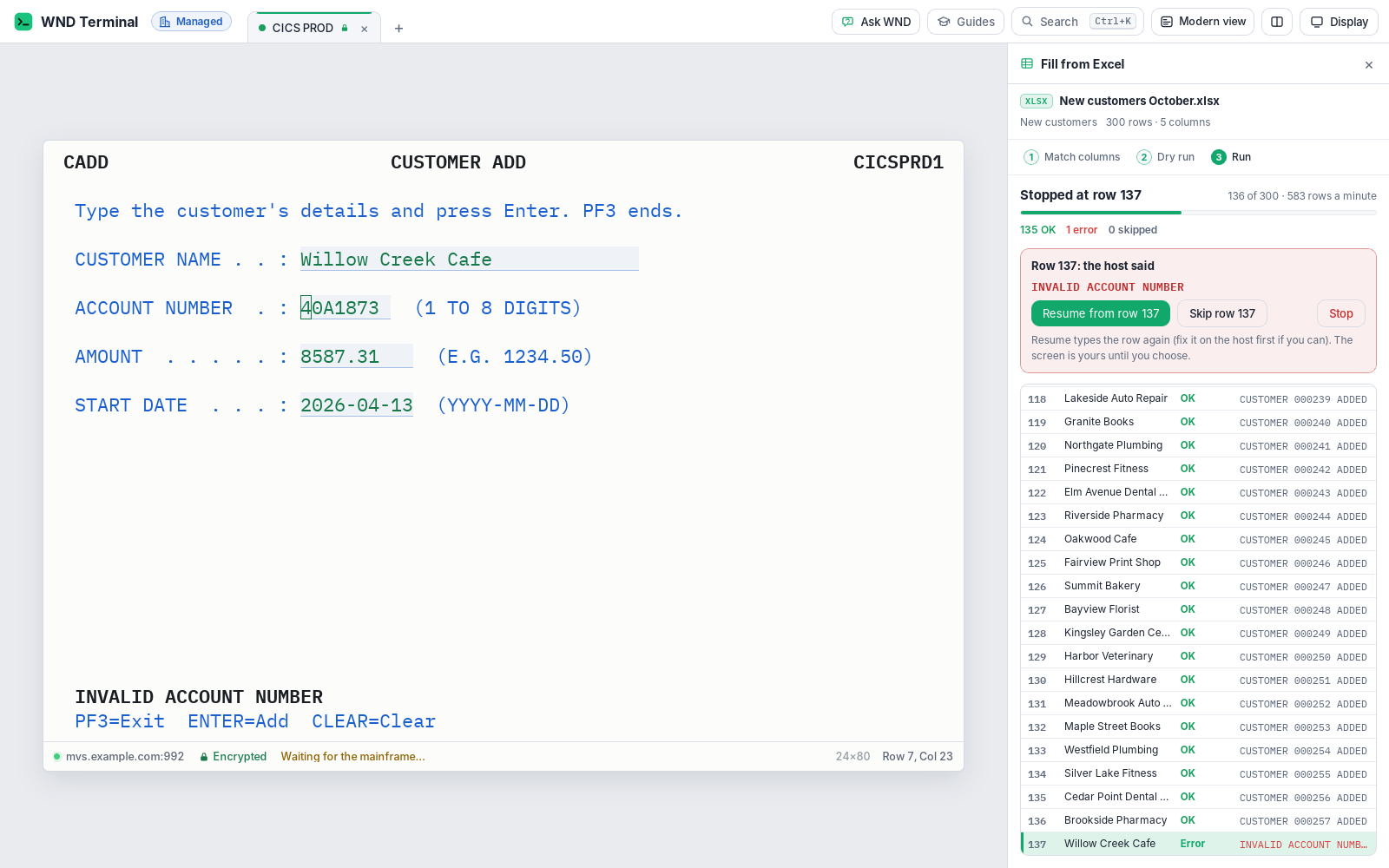
Fill from Excel is a WND Terminal feature that types every row of a spreadsheet (.xlsx, .xls, .ods or .csv) into a mainframe or IBM i entry screen, such as a CICS transaction, an ISPF panel or an IBM i program. You match the columns to the screen’s fields once, check a dry run, and run it. Each row’s result goes into a copy of your spreadsheet.
The problem
We get a spreadsheet of 300 new accounts from the business on Monday. Someone types them in, one screen at a time, for two days. A typo on row 137 doesn’t show up until someone audits it.
IT says a batch load is a project. It’s a spreadsheet and a screen we already use.
How it works
Drop the spreadsheet on the session
Or choose Fill from Excel from the command palette (Ctrl+K) or the right-click menu. WND Terminal reads the first sheet (with a sheet picker when there are more), uses the first row as column headings, and shows dates as dates.
Match columns to fields, once
WND Terminal lists the screen’s input fields and matches each column to the field whose label has the same words, so “Acct No” finds ACCOUNT NUMBER. Change any match, set the key that sends each row, and save it as a fill to use again.
Dry run
Nothing goes to the host. You see what would be typed into which field, and every row with a problem: a value too long for its field, letters in a numeric field, an empty required value.
Run
For each row, WND Terminal clears and types each matched field, presses the key, reads the host’s answer and keeps it. You see row N of M and rows per minute, and can pause at any time.
Get your results
A copy of your spreadsheet is saved next to the original, which is never changed, with two columns added: Status (OK, Error, Skipped or Not run) and Result (what the host said).
What it does
Works on the entry screens you have
CICS transactions, ISPF panels and IBM i programs, on mainframe (3270) and IBM i (5250). No host changes.
Knows success from failure
It reads the host’s message line after each row. Add the text success looks like (“RECORD ADDED”) and an error looks like (“INVALID”). A locked keyboard (X PROG on a 3270), IBM i’s error line and the alarm all count as errors.
Stops at the first error
It says which row and what the host said. Resume types that row again after you fix it, Skip row moves on, Stop ends the run.
Results back in Excel
The results copy keeps every original column and adds Status and Result. Copy puts the rows and their results on the clipboard.
Saved fills
Kept next to your macros and offered automatically whenever their screen appears.
Hands off while it types
The keyboard and mouse leave the screen alone during a run. Pause to type yourself.
IBM i fields handled
Fields that need Field Exit get it, so 5250 entry screens fill the way an operator would fill them.
In the browser too
Pick the file with the browser’s file picker; the results copy arrives as a download.
Under IT’s control
Every capability in WND Terminal follows the same rules: IT decides, the audit log records it, and nothing is sent to WND Software.
What the audit log records →- Every fill is in the audit log: the start (file, row count, the fill used, session and host), one line per row with its status and the host’s message, and the end with the counts.
- What was typed is never logged. Values hidden on the screen, such as card numbers and IT’s own patterns, stay hidden.
- IT can turn it off for everyone with one policy setting (
AllowFillFromExcel= false). A dropped spreadsheet is then refused with a message. - Response times count. Keys sent by Fill from Excel are timed like typed ones, so operations sees the load in the Operations view.
The other direction is already proven

Texas HHSC got mainframe data out into Excel with real columns using WND Terminal’s Copy as table. Keying errors in QA spreadsheets fell from 4.1% to 0.3%. Fill from Excel takes the spreadsheet back in.
Read the Texas HHSC story →A QA analyst reviewing 40 cases might retype 600 values.
Angela Ruiz, Director, Program Support Systems, Texas HHSC
Tested against a real run
WND tests Fill from Excel by filling a CICS-style Customer Add transaction with 300 rows in the real app, with one bad row at row 137, and checks the stop, the skip, the results workbook and the audit log.
Fill from Excel: questions
What file types does Fill from Excel read?
.xlsx, .xls, .ods and .csv. It reads the first sheet by default and offers a sheet picker when there are more.
Does it change my spreadsheet?
No. It saves a copy next to the original with two columns added, Status and Result. The original file is never changed.
What happens when the host rejects a row?
The run stops at that row and shows what the host said. You can fix it and resume, skip the row, or stop. Every row’s outcome is in the results copy and the audit log.
Can I check what will be typed before anything is sent?
Yes. The dry run shows exactly what would go into each field and lists every row with a problem, without sending anything to the host.
Does it work on IBM i screens?
Yes. Fill from Excel works on mainframe (3270) and IBM i (5250) entry screens, including IBM i fields that need Field Exit.
Can IT control or audit it?
Yes. IT can turn it off with one policy setting, and every fill writes a start event, one event per row and an end event to the audit log. What was typed is never logged.
Works well with
Bring a spreadsheet and an entry screen.
In a proof of value we run Fill from Excel against a test region of your own system, dry run first.