WND Terminal in a browser
The same app, in Chrome, Edge, Firefox or Safari, with nothing installed. Your IT team runs one small gateway on your own server; people sign in with their organization account.
Included in the Enterprise plan. See pricing
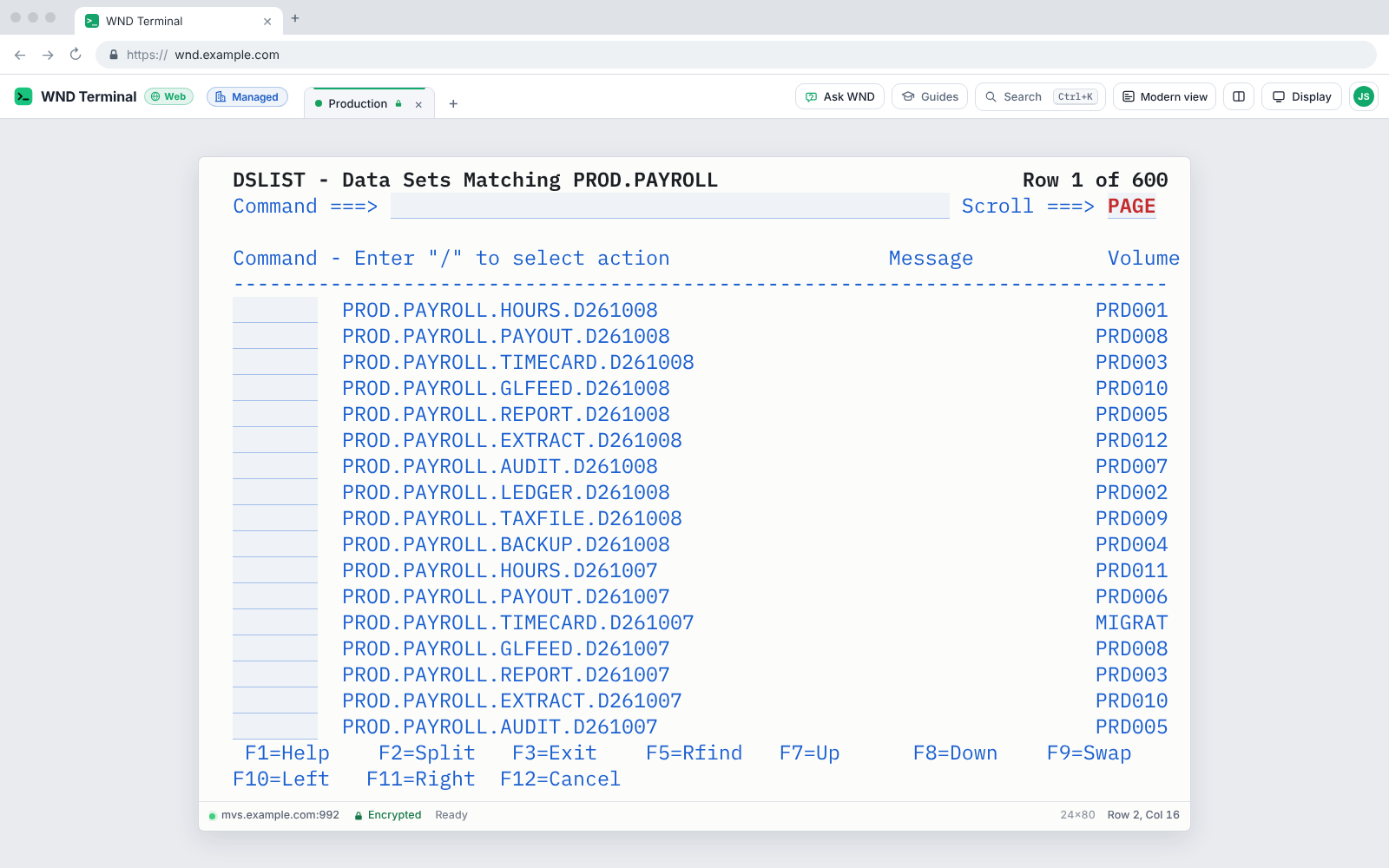
WND Terminal in a browser is the same WND Terminal app, delivered through the WND gateway, a single program the customer runs on its own Linux or Windows server. People open its address, sign in with Microsoft Entra ID, Okta, Google or another OpenID Connect provider, and get the same screens, keys and features as the desktop app, for mainframe (3270) and IBM i (5250). Sessions run on the gateway under the organization’s policy, license and audit log. A person counts as one seat whether they use the browser, the desktop app or both.
The problem
Contractors need mainframe access for six weeks. Imaging a laptop for them takes three.
Some of our people are on personal devices or Chromebooks. Today that means Citrix, and Citrix means tickets.
Deploy it in about 15 minutes on Linux
Get a name and a certificate
For example terminal.bank.example, with a TLS certificate from your certificate authority.
Register an app in your identity provider
Entra ID, Okta, Google Workspace, Ping, ADFS, Keycloak, Auth0, OneLogin or any OpenID Connect provider, with the redirect URI https://terminal.bank.example/auth/callback.
Install the gateway
On Linux (systemd), in Docker, or as a Windows service, with your policy.json (the same file as for the desktop app) and your license.
Check and start it
wnd-gateway check-config says whether everything is right. Start the service and open the address.
One gateway serves hundreds of people. There is no database and no other service.
What people get
The same WND Terminal
The same screens and keys, Modern view, Copy as table, Capture all pages, Fill from Excel, IBM i sessions, guides and Ask WND. A small “Web” badge shows it’s the browser version.
Sessions that survive a blip
If the browser’s connection drops (a lid closed, Wi-Fi changing), sessions wait, 60 seconds by default, and the window picks them up again.
Files the browser way
Spreadsheets and session files come from the browser’s file picker; results, captures and downloads arrive as browser downloads. Print screen uses the browser’s print dialog.
Keys that work
Ctrl+T, Ctrl+W and Ctrl+N belong to the browser, so a new tab is Alt+T, closing one is Alt+W, and Alt+Page Down/Up switches tabs. In Full screen, Chrome and Edge give every key to WND Terminal.
One seat per person
The same person in three browsers, or in a browser and the desktop app, is one seat. The License usage dashboard counts browser and desktop use together.
What stays in the desktop app
The IT views that read shared folders (License usage, Operations, Session recordings, Training progress, the Migration readiness report), trusting a certificate yourself, and smart-card sign-in to hosts.
The gateway security model
The gateway runs on your server. Sessions, sign-in and logs stay inside your network, and nothing passes through WND Software.
The full gateway security model →- HTTPS only, TLS 1.2 and 1.3, with HSTS. Plain HTTP only on the server’s own address, for testing.
- Sign-in with the OpenID Connect authorization code flow and PKCE; the ID token’s signature, issuer, audience, expiry and nonce are checked. Optional
allowed_domainsandrequired_groups. - Session cookie
__Host-wnd-session: HttpOnly, Secure, SameSite=Strict. The WebSocket is accepted only with that cookie and the gateway’s own Origin. - Never an open proxy. Sessions reach only the policy’s connections, plus typed hosts only if the policy allows it and their addresses are in
allowed_networks. Every resolved address is checked at connect time. - Isolation and timeouts. Each person’s sessions are theirs alone; they close on sign-out, after 30 idle minutes and after 12 hours by default.
- Same policy, license and audit log as the desktop, applied on the gateway, with each event marked
"via": "browser".
Reaching people without Citrix

The Home Depot moved 2,800 Mac users off Citrix with WND Terminal’s native Mac app and cut login to the first mainframe screen from 90 seconds to 5. The browser gateway covers the people a native install can’t reach: contractors, personal devices and anyone without a managed PC.
Read The Home Depot story →It worked the way Citrix always works, which is mostly.
Jason Whitaker, Senior Director, Workplace Technology, The Home Depot
Tested end to end
Sign-in with a stand-in identity provider, the network rules, the policy, the license, the limits and a full session against a test mainframe and test IBM i, plus a Chromium run of the web app on every build.
WND Terminal in a browser: questions
Is this a cloud service?
No. You run the gateway on your own server (Linux, Windows or Docker). Sessions, sign-in and logs stay inside your network. Nothing goes through WND Software.
Which identity providers work?
Microsoft Entra ID, Okta and Google Workspace, with step-by-step setup in the admin guide, and any other OpenID Connect provider, such as Ping, ADFS 2016 or later, Keycloak, Auth0 and OneLogin. A local users file is available for small sites and tests.
Does it support IBM i as well as the mainframe?
Yes. The browser version runs mainframe (3270) and IBM i (5250) sessions, including printers, from the same policy.
How are seats counted?
One seat per person, by their login, however many browsers or computers they use, and whether they use the browser, the desktop app or both.
Which features aren’t in the browser?
The IT views that read shared folders (License usage, Operations, Session recordings, Training progress and the Migration readiness report), trusting a host certificate yourself, and smart-card sign-in to hosts. Those stay in the desktop app.
Can people reach any host through the gateway?
No. Only the connections in your policy, plus hosts people type themselves if the policy allows it and their addresses are in the gateway’s allowed networks. The server itself and cloud metadata addresses are always refused.
Works well with
Stand it up in an afternoon.
In a proof of value, we set up the gateway with your identity provider and a test host on day one.