Less retyping. More work finished.
Use the same host applications with fewer manual steps. Type spreadsheet rows into forms, bring multi-page lists into Excel and turn unfamiliar screens into labelled forms.
About 60,000 hours of retyping removed a year. Texas HHSC’s result with Copy as table. Bring the same practical approach to getting data into and out of host screens. Read the story →
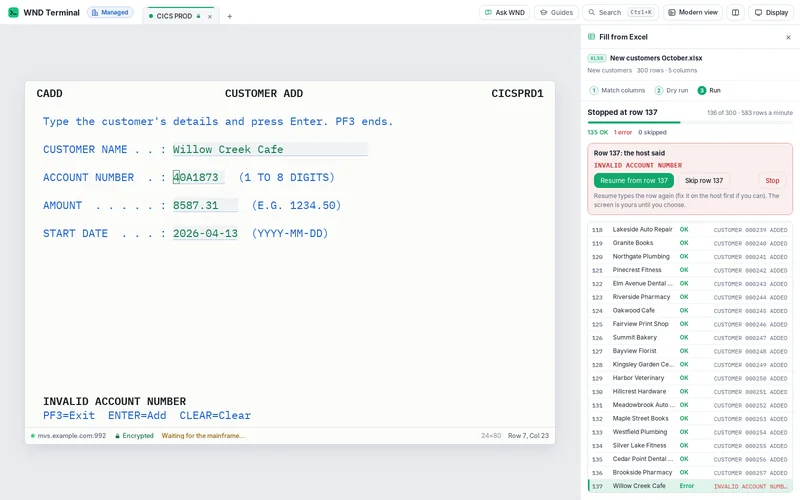
Fill from Excel, Capture all pages and Modern view work with the host screens you already have. These deterministic features need no AI model and do not change the host application.
- Into the host
- Map spreadsheet columns once, then fill each row.
- Out of the host
- Capture a list through its last page as one table.
- At the keyboard
- Switch the live screen into a labelled form.
Put spreadsheet rows into host fields
Map once
Drop the workbook on the entry screen and match its columns to the host’s input fields.
Check before the run
Review the first row and required fields. WND Terminal uses the same real input fields and keys as a person.
Keep the host’s answers
Each row gets the result beside it. An error stops the run so a person can correct, resume, skip or stop.
Get a whole host list into Excel
Press Ctrl+Shift+A on a supported list. Capture follows the next-page key, keeps the column headings, removes overlapping rows and stops at the end or its safety limit. Review the result and export it.
Watch Capture all pages → · Copy as table and host workflows.
Make the same live screen easier to use
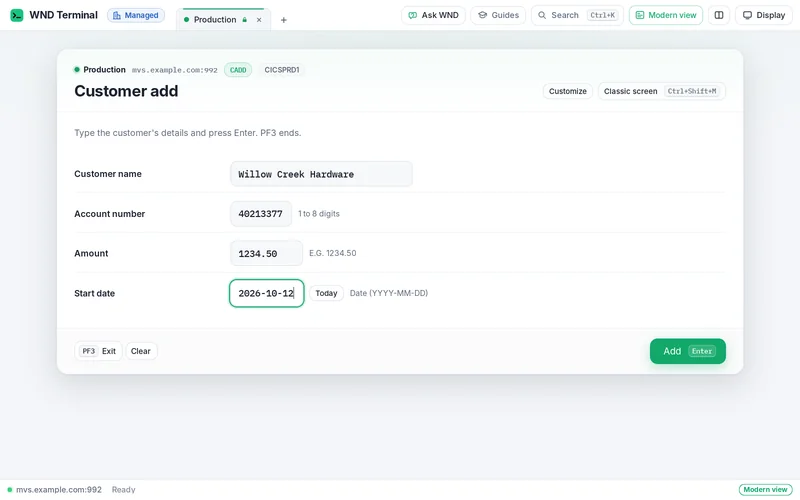
Ctrl+Shift+M switches between the classic terminal and Modern view. Labels, field controls, function-key buttons and sortable lists come from the live screen. Typing still reaches the real host fields.
IT can improve labels and layouts without a host services project. Watch Modern view →.
Help at the point of work
On a small screen, swipe the table to read all columns.
| What you need | What WND Terminal provides |
|---|---|
| Understand an error | Explain this screen uses Ctrl+E; IT chooses the model and masking policy. |
| Train on the real screen | Guided training puts the trainer’s steps next to the live application. |
| Send a complete ticket | Send to help desk assembles the masked support context under IT’s rules. |
| Keep familiar keys | Keyboard and emulator compatibility keeps the underlying terminal behavior available. |
60,000 hours at Texas HHSC
Texas HHSC removed about 60,000 hours of retyping a year by getting mainframe data into real Excel columns with Copy as table. Fill from Excel handles the opposite direction: spreadsheet rows into host entry fields.
Read Texas HHSC’s storyHow it is licensed
Fill from Excel, Capture all pages and Modern view follow the product plan and policy. Team trials are for managed work computers; Free is for an individual on their own computer.
Talk through your deployment or see Desktop and Enterprise pricing.
Questions
Do these features need AI?
No. Fill from Excel, Capture all pages and Modern view are deterministic. Explain this screen and Ask WND are separate AI features.
Does Modern view replace the host application?
No. It presents the same live session differently. The classic view and existing keys remain available.
What if a row fails?
Fill from Excel records the host result and stops for a person to review the problem. Resume, skip or stop as appropriate.
Can I use Free on my managed work PC?
No. Free refuses managed computers. Start the 30-day team trial for a work PC.
Bring the spreadsheet people retype.
Start with one entry screen and a sample worksheet in the team trial. A proof of value measures the time saved and checks the host’s replies on your systems.