Ask WND
Ask a question in plain English. WND works your session the way you would, shows every step, and answers with the screens it read. Read-only by default.
Included in every plan. See pricing
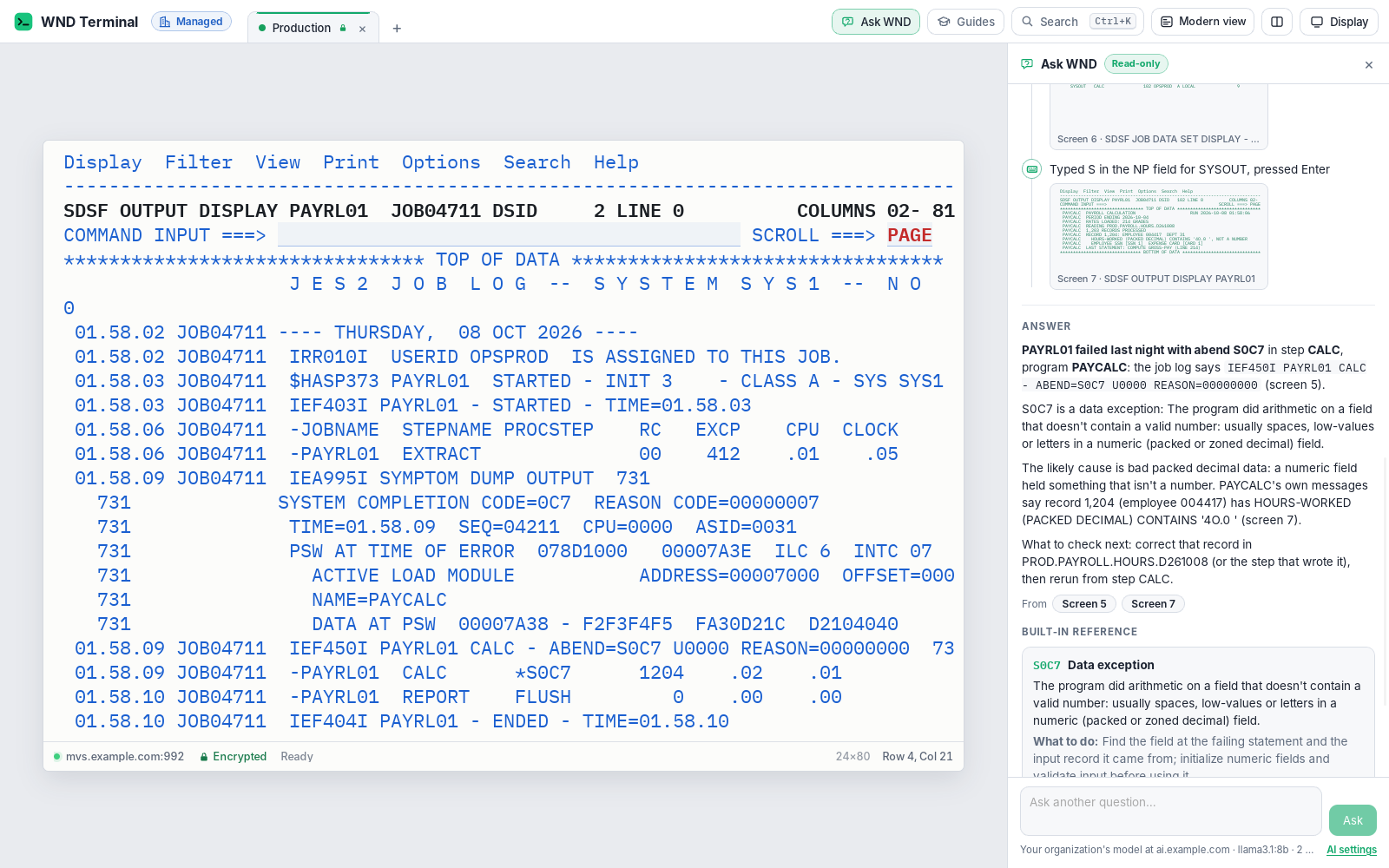
Ask WND is an AI feature in WND Terminal that answers questions about the mainframe or IBM i by working the person’s own logged-on session, step by step. Asked “Why did PAYRL01 fail last night?”, it opens SDSF, filters to the job, opens last night’s run, reads the job log and the program’s messages, finds the abend (S0C7), looks it up in a built-in reference and explains what happened and what to check next. It is read-only by default and uses a model server IT chooses, on the PC or inside the network.
The problem
The batch job failed at 2 a.m. By the time I’ve found it in SDSF, opened the right output and worked out what S0C7 means for this program, it’s 9:30.
Half our team has never had to read a JES job log. The people who could are retiring.
How it works
Ask
Press Ctrl+Shift+E (⌘⇧E on a Mac), or click Ask WND, and type the question: “Why did PAYRL01 fail last night?”
WND works the session
It opens SDSF, types PREFIX PAYRL01, opens last night’s run, reads the job log (JESMSGLG) and the program’s messages (SYSOUT), and finds IEF450I PAYRL01 CALC - ABEND=S0C7. Every step shows in the panel as it happens.
It answers, with sources
What happened, which step and program, the likely cause (here, bad packed decimal data) and what to check next. The answer links to the screens it came from.
You stay in charge
The keyboard waits while WND works. Stop (or Esc) ends it at once, and no key is sent after that.
On IBM i: “Why did job PAYROLL end abnormally?” WND uses WRKJOB, the job’s spooled files and the job log, and explains the escape message (MCH1202, RNQ0907 and others).
What it does
Works as you, nothing more
It uses the session you’re logged on to, with your user ID and authority, through the same keyboard. It can’t see or do anything you couldn’t.
Reads the screens a person would
SDSF, ISPF 3.4, TSO commands, CICS CEMT INQUIRE; on IBM i, DSP and WRK commands. It can page through a list, or read all of it as Capture all pages does.
Grounded answers
Abends (S0C7, S806, SB37, U4038), CICS abends (ASRA, AICA), common TSO and data set messages, DB2 SQL codes and IBM i messages (CPF, CPD, MCH, RNQ, SQL) come from a built-in reference, so even a small model gets the facts right.
Shows its work
Each step, each screen (click to see exactly what was sent to the model), and the screens the answer is based on.
Bounded
At most 25 steps and 10 minutes per question.
Any OpenAI-compatible model server
Ollama on the PC, or your own server inside your network. Works with models that support tool calling and falls back for those that don’t.
Built on Explain this screen
For a single screen, Ctrl+E explains any error, abend or message on it, from the same reference.
In the browser too
The model server is the one in your organization’s policy.
Nothing reaches the host before it is judged
Before any key goes to the host, WND judges the key and everything typed for it, using a table you can review. Typing is held back until a key is pressed, so nothing reaches the host before that judgment.
AIActionsMode | What happens to a change |
|---|---|
readonly (default) | Refused. Nothing is sent. |
ask | WND stops and shows exactly what it would type, into which field, and which key on which screen, with Allow once, Don’t allow and Stop. |
off | No Ask WND. AllowAI = false also turns it off. |
Allowed without asking
Commands known only to display, such as SDSF ST, DA, H, O, LOG, PREFIX, OWNER and FIND; ISPF’s data set list with B, V, I, S and M; TSO LISTCAT, LISTDS, STATUS and HELP; CICS CEMT INQUIRE and CEDA VIEW; IBM i DSP and WRK commands. Keys that only move around, and PF keys the screen’s legend doesn’t call Update, Add, Delete or Submit.
Counted as a change
Typing into a data field, SDSF P, C and A, TSO DELETE, SUBMIT and CANCEL, operator commands, CICS transactions, IBM i options such as 4=Delete, and Enter on a confirmation screen.
Under IT’s control
Every capability in WND Terminal follows the same rules: IT decides, the audit log records it, and nothing is sent to WND Software.
AI controls on the security page →- Masked first, sent only where IT says. The question and each screen are masked before they go to the model: card numbers, Social Security numbers, e-mail addresses, long account numbers and passwords typed in commands become tokens such as
[CARD 1]. - Password fields are never read or typed into. Values IT hides (
MaskCardNumbers,MaskPatterns) stay hidden. - The model is the one IT sets (
AIEndpoint,AIModel). Nothing goes anywhere else. - Audit log: one
ai.askevent per question and oneai.ask.changeper change allowed or refused. Never the question, the screens, what was typed or the answer.
Built on a proven foundation

Nationwide cut mainframe service-desk tickets by 40% with WND’s Explain this screen, using a model it hosts in its own network, with sensitive data masked first. About 80,000 hours saved a year; new developers became independent in 7 weeks instead of 16. Ask WND builds on the same reference and the same masking, and does the legwork across screens.
Read the Nationwide story →Tested end to end
A real session against a test mainframe and a test IBM i: the PAYRL01 question, a purge refused in read-only mode, “ask” mode declined (nothing reaches the host) and allowed (the host gets the P), and the IBM i job log.
Ask WND: questions
Where does the AI model run?
On a model server your IT team chooses: Ollama on the same computer, or any OpenAI-compatible server inside your network. IT sets the server and model for everyone (AIEndpoint, AIModel), and Ask WND sends nothing anywhere else.
Can Ask WND change data on the mainframe or IBM i?
Not by default. In read-only mode, anything that could change data is refused and nothing is sent. IT can choose “ask” mode, where WND shows the exact change and waits for the person to allow it, or turn Ask WND off.
What data does the model see?
The question and the screens WND reads, masked first: card numbers, Social Security numbers, e-mail addresses, long account numbers and passwords typed in commands become tokens. Password fields are never read, and values IT hides stay hidden.
Can it do anything I’m not allowed to do?
No. It works in your own logged-on session, with your user ID and authority.
What does it log?
One audit event per question and one per change allowed or refused. The question, the screens, what was typed and the answer are never logged.
Does it work on IBM i?
Yes. It uses WRKJOB, the job’s spooled files and the job log, and explains IBM i messages such as MCH1202 and RNQ0907 from the built-in reference.
Works well with
Ask it about your own jobs.
In a proof of value we connect Ask WND to a model server inside your network and ask about last night’s batch, read-only.