Migration readiness report
Point WND Terminal at the share full of PCOMM, Reflection, BlueZone and ACS files. A few minutes later, you have a one-page report for the CIO and a policy ready to deploy.
Included in every plan. See pricing
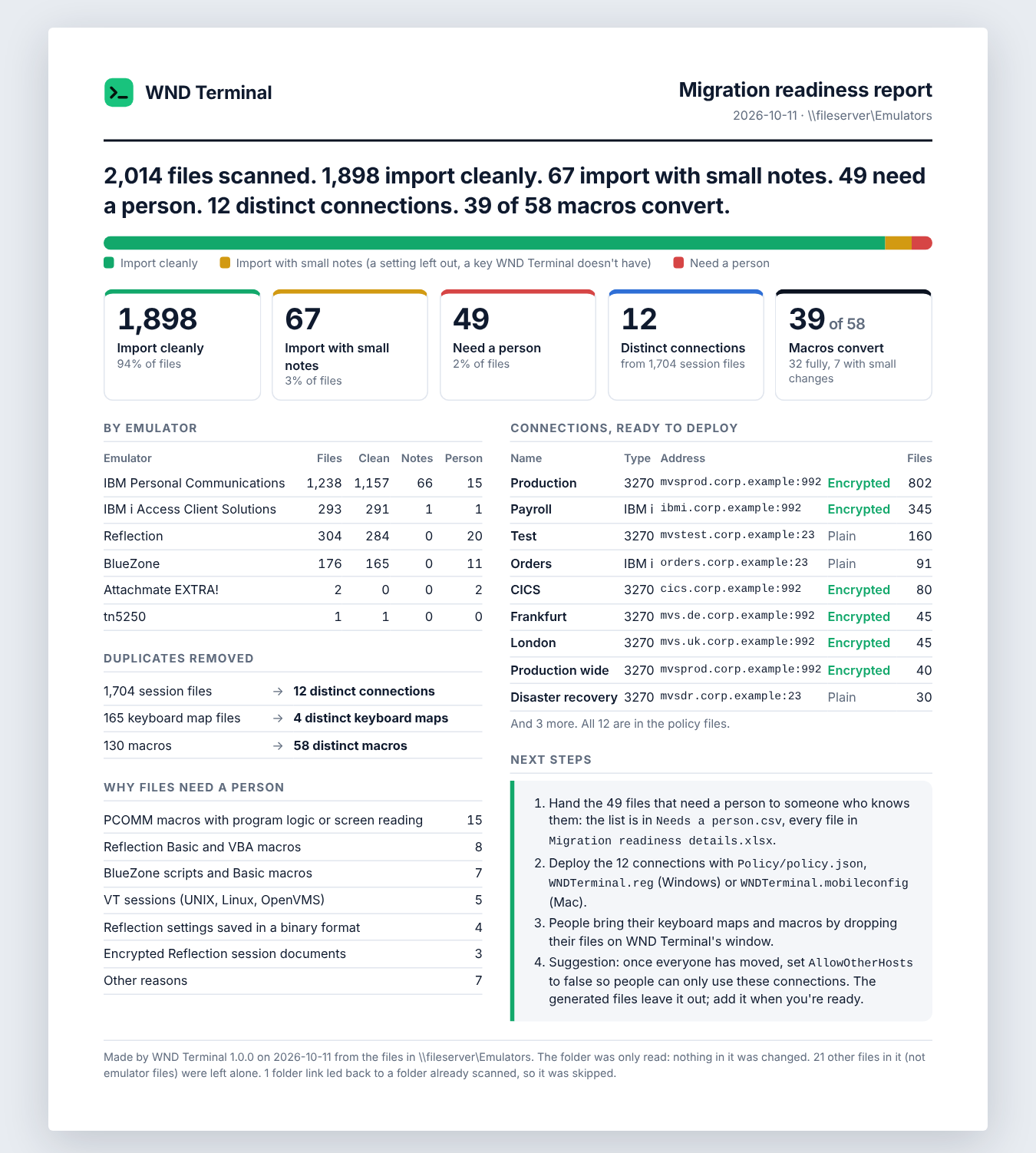
The Migration readiness report is a WND Terminal feature for IT teams replacing an emulator across an organization. It reads every IBM Personal Communications, IBM i Access Client Solutions, Reflection and BlueZone session, keyboard and macro file in a folder and its subfolders, sorts each file into “imports cleanly,” “imports with small notes” or “needs a person,” removes duplicates, converts PCOMM macros where it can, and writes a one-page report, a detail workbook and the distinct connections as a ready-to-deploy policy for Windows and Mac.
The problem
We have twenty years of session files on a share. Nobody knows how many are still used, which ones are copies, or which macros matter.
Leadership wants one number: how hard is this move?
How it works
Point it at the folder
In WND Terminal, Ctrl+K > Migration readiness report. Paste the path (\\fileserver\emulators$ works on Windows) or drop the folder on the window. Or run it from a script with no window.
WND Terminal reads every file
Folder and subfolders, several files at a time. About 2,000 files take a few seconds on a local disk. It changes nothing.
Each file lands in one of three groups
Imports cleanly. Imports with small notes (a setting left out, a key WND Terminal doesn’t have). Needs a person, with the reason (a macro with program logic, a VBA macro, an encrypted file, a VT session).
Duplicates collapse
Sessions that reach the same host, port, terminal or device name, encryption and screen size become one connection. Identical keyboard maps and macros become one.
Hand over the report, deploy the policy
Print the one-page report for leadership. Review the generated policy and deploy it with Group Policy or Intune on Windows, or your device manager on Mac.
From a script: wnd-terminal --readiness-report "\\fileserver\emulators$" --out "D:\Reports" makes the report without opening a window, prints the headline and exits with 0 when it succeeds.
What you get
Migration readiness report.html
One page for leadership that prints on one page: the headline in plain English, numbers by emulator, what the duplicates came down to, why files need a person, the connections and the next steps.
Migration readiness details.xlsx
One row per file (path, emulator, outcome, notes, and the connection, keyboard map or macro it maps to), plus sheets for files needing a person, distinct connections, keyboard maps and converted macros.
Needs a person.csv
The exact list of files someone has to look at, with the reason for each.
Policy/policy.json
The distinct connections as IT’s Connections setting.
Policy/WNDTerminal.reg
The same connections as Group Policy registry values.
Policy/WNDTerminal.mobileconfig
The same connections as a Mac configuration profile.
Every major emulator’s files, from one share
An example headline, from WND’s own test share of 2,035 files: “2,014 files scanned. 1,898 import cleanly. 67 import with small notes. 49 need a person. 12 distinct connections. 39 of 58 macros convert.”
| Emulator | Files read |
|---|---|
| IBM Personal Communications | Workstation profiles (.ws, 3270 and 5250), keyboard files (.kmp), macros (.mac, converted where possible), backup hosts and host code pages |
| IBM i Access Client Solutions | 5250 session files (.hod) and batch files (.bchx, .bch) |
| Reflection | Reflection Desktop session documents (.rd3x, .rd5x), Reflection for IBM settings saved as XML, and Reflection for IBM 11 and earlier text settings (.rsf). Encrypted documents and VT sessions are recognized and listed for a person. |
| BlueZone | Mainframe (.zmd) and iSeries (.zad) display sessions; printer, VT and other profiles recognized and explained |
| Counted for a person | BlueZone scripts and Basic macros, Reflection Basic and VBA macros, EXTRA! Basic macros, and scripts that drive an emulator |
Under IT’s control
Every capability in WND Terminal follows the same rules: IT decides, the audit log records it, and nothing is sent to WND Software.
How the policy is deployed and enforced →- Read-only. The report reads the folder and changes nothing in it. Files over 16 MB and files it can’t read are skipped with a note.
- Nothing locked down by surprise. The generated policy contains only
Connections. The report suggests turning on “only IT’s connections” (AllowOtherHosts= false) once everyone has moved, but doesn’t set it. - Audit log: each report is recorded (
readiness.report, with the folder and the counts only). - Runs on your machine. Nothing is sent to WND Software.
Big estates, moved in weeks

Union Pacific imported 1,900 session profiles and 340 keyboard maps in two days, against an estimate of nine months to rebuild them by hand. WND Terminal listed everything it could not convert.
Read the Union Pacific story →Our estimate to rebuild it all by hand was nine months. The vendor knew that, and priced accordingly.
Greg Halvorsen, Director, Operations Technology, Union Pacific

Fifth Third Bank imported its existing session profiles and keyboard files, deployed through Group Policy with an MSI, and rolled out in waves.
Read the Fifth Third story →Migration readiness report: questions
Which emulators’ files does the report read?
IBM Personal Communications, IBM i Access Client Solutions, Reflection (Desktop and for IBM) and BlueZone, for both 3270 and 5250 sessions, plus keyboard files and macros.
Does it change our files?
No. It only reads the folder and its subfolders. The report goes to a new folder you choose.
How long does it take?
About 2,000 files take a few seconds on a local disk; a network share takes longer, typically a minute or two.
What happens to our macros?
PCOMM macros (.mac) are converted to WND Terminal macros where they can be, fully or with message boxes left out. Reflection Basic and VBA, BlueZone, EXTRA! Basic and other scripted macros are counted and listed for a person to review.
Can we run it from a script?
Yes. wnd-terminal --readiness-report “<folder>” --out “<folder>” makes the report without opening a window, prints the headline and where the report went, and exits with 0 when it succeeds.
How do we deploy the result?
Review the generated files, then import WNDTerminal.reg (or set the same values with Intune or Group Policy), upload WNDTerminal.mobileconfig to your Mac device manager, or copy policy.json into place.
Works well with
Know exactly what moves before anything moves.
Every proof of value starts with this report, run on your own machine against your own share.