WND Terminal vs Rocket Reflection Desktop
Keep your supported Reflection sessions, keys and macros. WND Terminal also has VT, HP 3000 and NonStop terminal profiles, native Mac and Linux apps, and a browser gateway for supported IBM and VT sessions.
WND Terminal includes every feature for at most $75 per user per year, with a 100-user minimum. A proof of value takes two to four weeks. Compare your current vendor quote and migration work in the savings calculator. Review updated .
Reflection is now a Rocket Software product. Existing estates and documentation may still call it Micro Focus Reflection or Attachmate Reflection. This comparison refers to Reflection Desktop; it is separate from Rocket Terminal Emulator, formerly BlueZone.
Compare several Reflection alternatives · Reflection session import guide · Reflection Basic and VBA compatibility
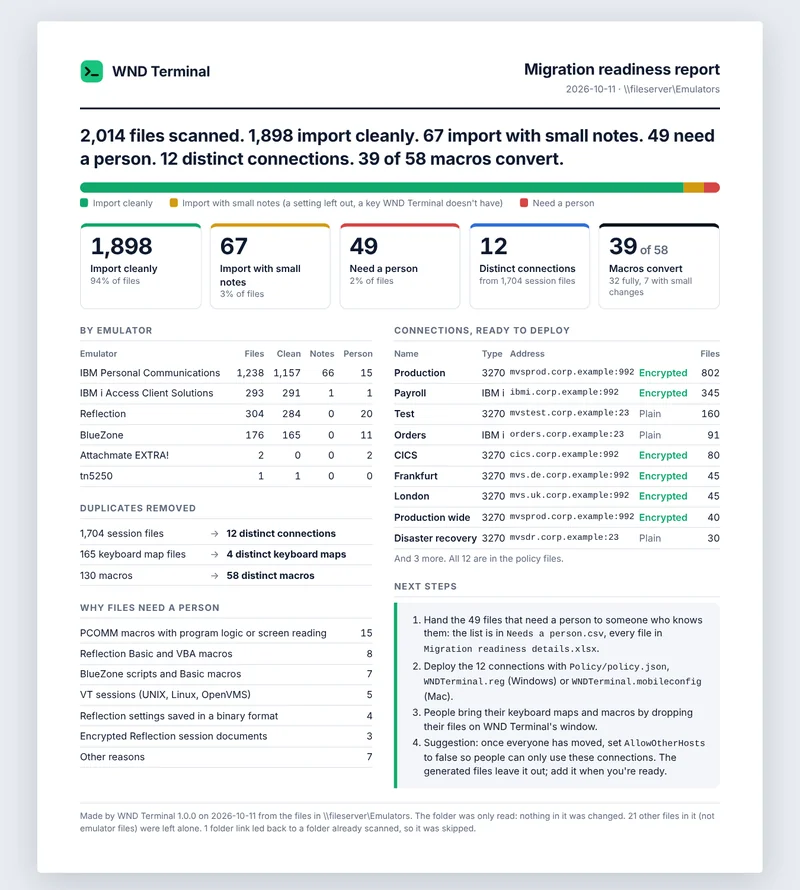
WND Terminal is an alternative to Rocket Software’s Reflection Desktop for IBM mainframe (3270) and IBM i (5250) access. It imports Reflection Desktop session documents (.rd3x for 3270, .rd5x for 5250), Reflection for IBM settings saved as XML, and Reflection for IBM 11 and earlier text settings files (.rsf), along with keyboard maps. Reflection Basic and Reflection Desktop VBA macros run as they are, programs that use Reflection’s API or EHLLAPI keep working, and VT sessions connect over SSH or Telnet. It runs on Windows, natively on Mac, on Linux, and in a browser through a gateway you host.
Compare terminal models before moving a Reflection group
Rocket Reflection Desktop's own data sheet lists IBM, UNIX, Linux, OpenVMS, HP 3000 and HP NonStop systems. Its NonStop 6530 option is a named add-on, while Reflection Desktop Pro adds an X server. WND Terminal's current tagged inventory covers the text-terminal profiles below; it does not include an X server.
On a small screen, swipe the table to read all columns.
| Host and terminal | WND Terminal current scope | Rocket Reflection Desktop scope |
|---|---|---|
| IBM Z 3270 / IBM i 5250 | 3270, TN3270E and 5250 profiles over Telnet or TLS. | IBM mainframe and IBM i access in Reflection Desktop. |
| UNIX, Linux and VT applications | VT100, VT220, VT320 and xterm-compatible behavior over SSH or Telnet, plus scoped VT52/VT102 and partial VT420/VT520 profiles over Telnet. | VT and UNIX/Linux access; check each terminal model and application. |
| Wyse, IBM 3151 and PC ANSI families | Scoped Telnet profiles for WY-50/WY-50+/WY-60, IBM 3151 echo mode, BBS ANSI/CP437, SCO ANSI and AT386. See each profile limit in supported systems. | Verify the exact Rocket product, terminal type and license in your estate. |
| HP 3000 | HP 700/92 and 2392A over Telnet, in character and block modes; partial HP 700/94 for common character and basic forms. | HP 3000 access is listed in Reflection Desktop. |
| HPE NonStop | 6530 over Telnet, conversational and block sessions. | Reflection Desktop for NonStop Add-On is a separate named product. |
| Unisys T27 / UTS and airline ALC | T27, UTS 60 and P1024B ALC profiles, with ALC over MATIP type A. | These are not listed in the cited Reflection Desktop data sheet. Check InfoConnect or another licensed Rocket component. |
| Airline printers and readers | Software-only virtual ATB/BTP routing, synthetic reader and bounded ZPL sample tag; physical devices and IATA/AEA protocols need a customer trial. | Check any separately licensed airline device product and physical models. |
| Migration | Read supported .rd3x, .rd5x and .rdox sessions. Set up specialty connections and check macros separately. | Reflection Desktop uses its own session and macro formats; catalog the actual files before switching. |
| Central and browser access | Desktop policies; a customer-hosted browser gateway for supported IBM and VT profiles. Specialty profiles are desktop-only in this inventory. | Reflection Desktop can be paired with MSS for central management. Browser access is a separate Rocket product or Secure Host Access Anywhere tier. |
Check WND Terminal models, transports and limits · Try five established synthetic hosts · Run sixteen model sample hosts. An imported session file does not prove all host keys, macros or devices work in your environment; test those in a proof of value.
Rocket sources: Reflection Desktop data sheet, NonStop Add-On data sheet, Reflection Desktop Pro data sheet, MSS data sheet and Secure Host Access tiers, reviewed October 20, 2026.
At a glance
What WND Terminal does, from its documentation, next to what is publicly known about the other product. A check means the feature is in that product’s public documentation.
On a small screen, swipe the table to read all columns.
| Capability | WND Terminal | Reflection Desktop (Rocket) |
|---|---|---|
| IBM Z mainframe (3270, TN3270E) | Yes | Yes |
| IBM i (5250) display | Yes | Yes |
| VT and UNIX sessions | Yes | Yes |
| Mac | Yes | Not found in public documentation |
| Browser access | Yes | Yes1 |
| Imports other emulators’ session and keyboard files | Yes | Yes2 |
| Estate-wide migration report with a deployable policy | Yes | Not found in public documentation |
| Central lockdown of user settings (Group Policy or MDM) | Yes | Yes |
| Screen history | Yes | Yes |
| Recent typing and autocomplete | Yes | Yes |
| Card-number and pattern masking | Yes | Yes |
| Audit log to Splunk or CEF/syslog | Yes | Not found in public documentation |
| Tamper-evident session recording | Yes | Not found in public documentation |
| AI that explains the screen | Yes | Not found in public documentation |
| AI that works the session for you | Yes | Not found in public documentation |
| Terminal access from ChatGPT or Claude (MCP) | Yes | Not found in public documentation |
| Error and abend hints on screen | Yes | Not found in public documentation |
| Modern view of live host screens | Yes | Yes3 |
| Fill screens from Excel and capture multi-page lists, no scripting | Yes | Not found in public documentation |
| License usage reporting | Yes | Yes4 |
| Smart card (CAC/PIV) sign-in | Yes5 | Yes |
| VBA and Reflection Basic macros | Yes6 | Yes |
| Response times to OpenTelemetry | Yes | Not found in public documentation |
| Fleet discovery and first-run import | Yes | Not found in public documentation |
| Print routing to folder, email and PDF | Yes | Not found in public documentation |
| Session handoff between windows of one sign-in (browser) | Yes | Not found in public documentation |
| Help desk joins a live session with consent (browser) | Yes | Not found in public documentation |
| Screen translation | Yes7 | Not found in public documentation |
| VS Code extension | Yes | Not found in public documentation |
| Published VPAT | Yes | Not found in public documentation |
| Terminal screen translation with deployable language packs | Yes | |
| Screen Access: restrict host applications, screens and field values by role | Yes | |
| Real User Monitoring in Gateway: operator wait and host response | Yes | |
| Guided learning and operator onboarding on live screens | Yes | |
| Ask WND lookups from approved external MCP tools | Yes | |
| AI answers with citations from company runbooks | Yes |
- Through Rocket Secure Host Access Anywhere, sold separately.
- PCOMM and Rumba session files.
- Plus edition. Adds controls to the host screen.
- Through Rocket’s separate management server (MSS).
- Desktop app.
- Run by WND Terminal’s own engine. Lines it doesn’t support are listed by line number.
- In Modern view. From your glossary first, and an AI model when IT allows it.
Checks come from each vendor’s publicly available documentation, as of October 2026. A blank cell means we found no public documentation for that feature. Products change, so check with the vendor to confirm before you decide. The vendor pages behind the checks include Rocket on masking in Reflection Desktop, the Reflection Desktop lockdown guide, the Reflection Desktop feature list, Screen Designer, smart card setup, Secure Host Access Anywhere, Rocket’s answer on Mac support and Reflection productivity tools (screen history, recent typing, auto complete).
Reflection, BlueZone, Rumba and Extra! are trademarks of Rocket Software. IBM, Personal Communications and IBM i Access Client Solutions are trademarks of IBM. WND Software is not affiliated with or endorsed by these companies.
What changes when you move
- Your files come with you.Reflection Desktop
.rd3xand.rd5xdocuments are read directly, with host, port, device name, screen size and host code page. Rocket doesn’t publish the schema, so WND Terminal finds settings by name and lists anything it can’t use. It doesn’t silently drop them. - Your macros and programs keep working.Reflection Basic and Reflection Desktop VBA macros run in WND Terminal’s own engine, imported from the macro file, a
.basmodule or the session document. On Windows they can still fill Excel. Programs that useReflectionIBM.Sessionor EHLLAPI keep working too. See Run your existing macros. - UNIX hosts too.Reflection’s VT documents (
.rdox) import as SSH or Telnet sessions, VT100 to VT320 with xterm colors, in the same tabs as the mainframe. - Know the hard part up front.Encrypted Reflection documents and binary
.rsffiles from version 12 and later are flagged “needs a person” in the Migration readiness report, with the exact file list. Each macro is marked as running in WND Terminal, or listed with the lines that need a change. For binary.rsf, the app explains how to save the settings as XML from Reflection. - Mac, Linux and browser without Citrix.A native app for Apple Silicon and Intel Macs, packages for Linux desktops, and a browser version through a gateway on your own server. The Home Depot retired 38 Citrix servers by moving 2,800 Mac users to WND Terminal’s Mac app.
- Built in, not scripted.Fill from Excel, Capture all pages and Modern view do out of the box what Reflection shops often build with VBA macros.
- Evidence for audit and operations.Tamper-evident session recording, an audit log to Splunk or CEF/syslog, and response-time monitoring from the user’s side.
- Honest gaps.A macro line that uses something WND Terminal doesn’t have, such as Reflection’s
ThisFrameor DDE, is listed with its line number. The readiness report shows how many macros that affects, file by file.
What customers changed when they switched
From WND Terminal’s published customer stories. The stories don’t name the previous vendor.
- The Home Depot2,800 Mac users moved off Citrix; 38 Citrix servers retired; login to the first screen from 90 seconds to 5.
- Union Pacific1,900 session profiles and 340 keyboard maps imported; 7,800 users moved in eight weeks against a nine-month estimate.
Renewal context from the same stories: customers describe 12% at the last renewal (The Home Depot) and 10% plus a five-year commitment to cap future increases (Union Pacific).
Questions about switching
Can WND Terminal import Reflection session files?
Yes. It reads Reflection Desktop .rd3x (3270) and .rd5x (5250) documents, Reflection for IBM XML settings, and .rsf text files from Reflection for IBM 11 and earlier. VT (.rdox) documents import as UNIX and Linux sessions. Encrypted documents are recognized and explained.
Can WND Terminal run Reflection VBA macros?
Yes. Reflection Basic and Reflection Desktop VBA macros run as they are, imported from the macro file, a .bas module or the session document that holds them. WND Terminal runs them in its own engine and lists any line it can’t run with its line number. How it works.
What about programs that drive Reflection through its API?
They keep working. WND Terminal comes with COM objects that answer to ReflectionIBM.Session, and EHLLAPI DLLs under the names programs load. IT turns them on at install. How it works.
Does WND Terminal run on a Mac?
Yes, natively on Apple Silicon and Intel (macOS 11 or later). It runs on Windows and Linux desktops too.
Does WND Terminal have screen history, recent typing and autocomplete?
Yes. Ctrl+K, then Screen history, goes back through the last 100 screens of a session. Recent typing lists what you sent, to type again. In a field you’ve used before, the last entry is suggested, and Ctrl+Space types it. Passwords are never kept. How it works.
Can we run both side by side during the move?
Yes. Keep both emulators available during the pilot and each rollout wave so users can fall back while IT validates their sessions and workflows.
Other comparisons
Run the readiness report on your Reflection share.
Every proof of value starts with the Migration readiness report on your own files, so you know what moves before anything does. Free, two to four weeks.
Watch a sample Reflection session import
Recorded product walkthrough using a synthetic .rd3x file and a local sample host. It shows import and connection, not a customer migration or a test of every macro.
Transcript: select the sample Reflection session file, review the parsed connection, add it, connect and sign on to the fictional host.
How should we evaluate WND Terminal against Rocket Reflection Desktop?
Start with the exact host protocol, deployment and workflows covered by your current product. Have a user complete sign-on, an ordinary transaction, a rejected entry and cancellation with the familiar keys. Test printing, file transfer and actual automation separately where used. For browser delivery, include gateway and identity administration in the comparison; for an application-modernization project, include the required interface work. A successful connection alone does not establish an equivalent replacement.
Check WND Terminal’s supported profiles and limits, current plan scope and pricing, and the migration evaluation steps.
Plan a mainframe emulator evaluation
Use the 3270 and TN3270 emulator guide to check host connections, keys, printing and deployment. For a customer example of native Mac access instead of Citrix delivery, read The Home Depot’s story. That story does not name the previous emulator vendor; it is evidence of the workflow, not a claim that this customer replaced the product compared here.