Control the work. Keep the evidence.
Approve sensitive keys, bound time-limited access, review recorded sessions and see which applications people use. Your organization keeps the rules and the records.
The key waits. A second person decides. See a gateway hold Enter for approval, then keep the outcome and recording as evidence. Watch the walkthrough →
WND Terminal combines gateway privileged-access rules, session recording, audit and masking, response-time monitoring and Usage intelligence. Privileged enforcement is gateway-only; collection and visibility follow your policy.
- Before a sensitive action
- Approval, elevation, recording or blocking on the gateway.
- After the session
- Review tamper-evident recordings and audit evidence.
- For the CIO
- Application, transaction, department and error reports.
Approve the key before it reaches production
Gateway rules match the connection, screen and key. An approval rule holds a person’s key for a second person; an elevation rule requires an approved time window. Record and block rules cover the other two outcomes.
Define the rule
Write
PrivilegedRulesor the gateway rules file. Runwnd-gateway check-privileged rules.jsonandwnd-gateway check-configbefore deployment.Review the request
The gateway’s
/approvalspage shows the person, reason and masked screen. A person cannot approve their own held key.Check again before sending
If the screen or typed values changed while approval waited, the key is refused. Approved windows end on time; privileged sessions are recorded and enter the review queue.
Scope: these rules govern browser, embedded, agent and API sessions running on your gateway. They do not enforce native desktop sessions. Programs cannot wait on a privileged key approval; a key held by an approval/elevation rule is refused to them. Privileged access guide.
Hold the key. Get a second person’s approval.
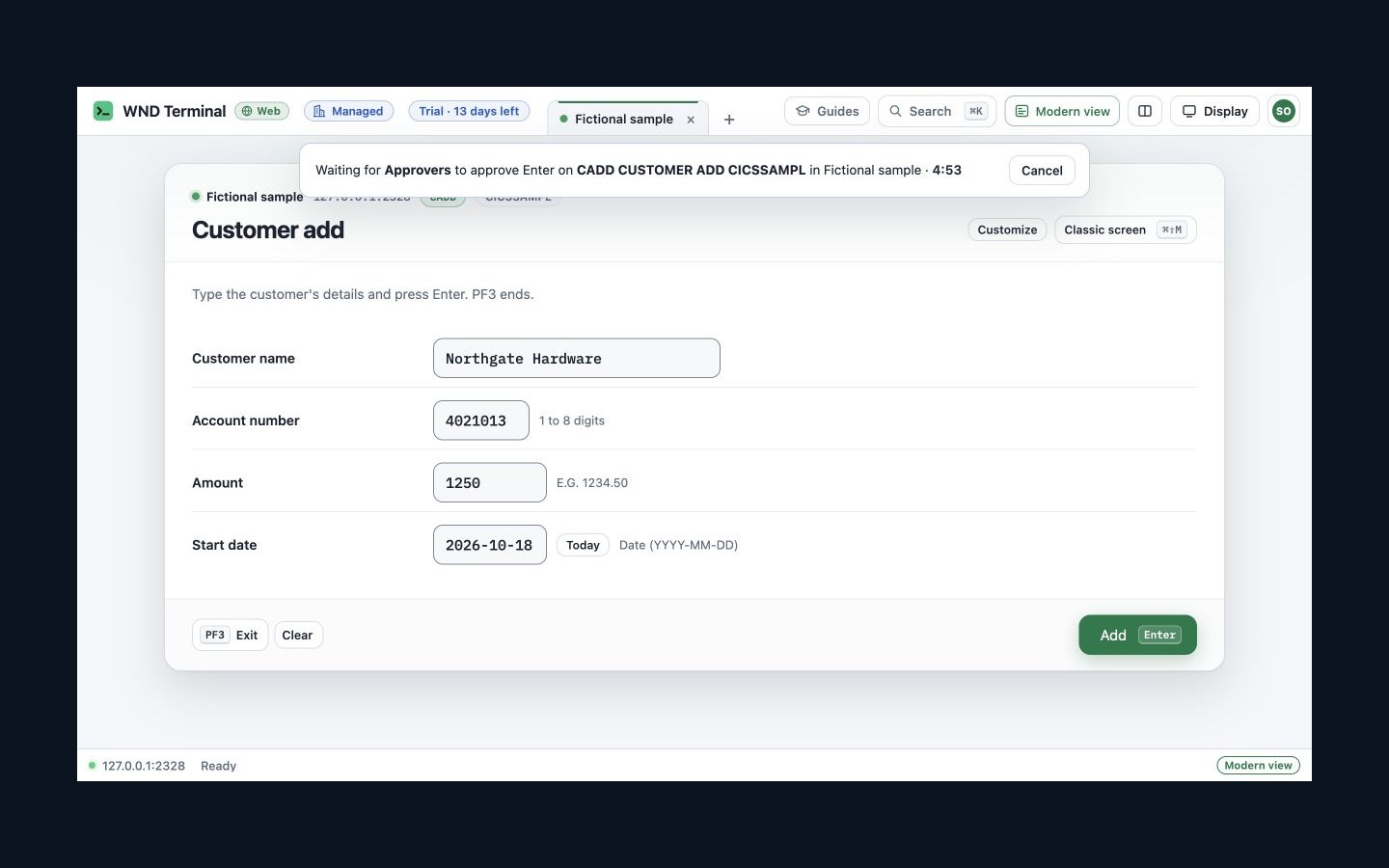
A 16-second walkthrough of gateway-only privileged access. Two fictional users review a customer-entry action on a local sample host; no production system or payment is used.
Read the visual walkthrough
- The operator presses Add. A gateway rule holds Enter and asks for a reason before anything reaches the host.
- The session waits for the Approvers group, with a timeout and Cancel action.
- A separate approver reviews the operator, rule, reason, typed fields and screen in the gateway’s Approvals page.
- After approval, the gateway sends Enter. The operator sees who approved it, CUSTOMER 000125 ADDED and the recording indicator.
See what your applications are used for
Applications, Transactions, Departments and Errors reports compare 7, 30 or 90 days with the preceding period. See wait times, timeouts, error codes and time spent waiting; export CSV or PDF or query the report from BI tooling.
Start with RecordResponseTimes and your own response-time folder or gateway collector. ResponseTimeIncludeTitle and ResponseTimeIncludeUser default off. Optional titles are masked; logins can be included when IT enables them. Without user collection, people are counted by computer.
InsightMinGroup defaults to five. Small departments fold into Other, including additional folding when needed to prevent working out a small group. What your organization collects shows the policy in force to users and works councils.
One evidence trail in your infrastructure
On a small screen, swipe the table to read all columns.
| What you need | What WND Terminal provides |
|---|---|
| Privileged review | Gateway approval/elevation records and the recording review queue. Privileged access. |
| Recording | Masked, hash-chained and signed session records. Session recording. |
| Audit and SIEM | Security events to your folders and supported SIEM formats. The security audit log does not contain host screen contents or keystrokes. Audit scope. |
| Operations | Response times and OpenTelemetry export for diagnosis. Response-time monitoring. |
| Review materials | Read the security page, policy reference and accessibility report. Compliance mappings describe controls; they are not WND Terminal certification claims. Security · Public review packet. |
Evidence that stays at Fifth Third
Fifth Third uses the usage dashboard to document actual license use. It found 3,300 of 7,400 seats unused in 90 days and cut its annual emulator bill by 81%. Its story describes customer-owned storage; it is not a claim about every optional collection setting.
Read Fifth Third’s storyHow it is licensed
Privileged access and Usage intelligence are separately entitled products. Session recording and related controls follow your Desktop/Enterprise plan and policy. Contact WND Software for the combination and commercial terms your deployment needs.
Talk through your deployment or see Desktop and Enterprise pricing.
Questions
Does privileged access protect the desktop app?
Not in this release. Enforcement runs on the gateway, including browser and embedded sessions. Use gateway sessions where those rules are required.
Are screen titles or login names collected?
Those options default off. IT can enable masked titles and login collection; the collection disclosure shows the active settings. Read the Usage intelligence field and retention reference.
Are small departments identifiable in the report?
Groups below InsightMinGroup are folded into Other, with additional folding when necessary to prevent a small group being inferred.
Is a compliance mapping a certification?
No. A control mapping explains what evidence and controls WND Terminal provides. It is not a certification of WND Terminal or of your deployment.
Bring the action that needs a second person.
Agree the gateway rule, approver and evidence your security team needs. A free proof of value checks the complete approval and review path on your systems.