AI that works your mainframe.
Ask about your live host screens and your company’s procedures. Choose OpenAI, Claude or a local model, connect the application documentation, and see the sources used in the answer. IT controls the connections and permitted actions.
40% fewer mainframe service-desk tickets. Nationwide’s result with Explain this screen and a model hosted inside its network. Read the story →
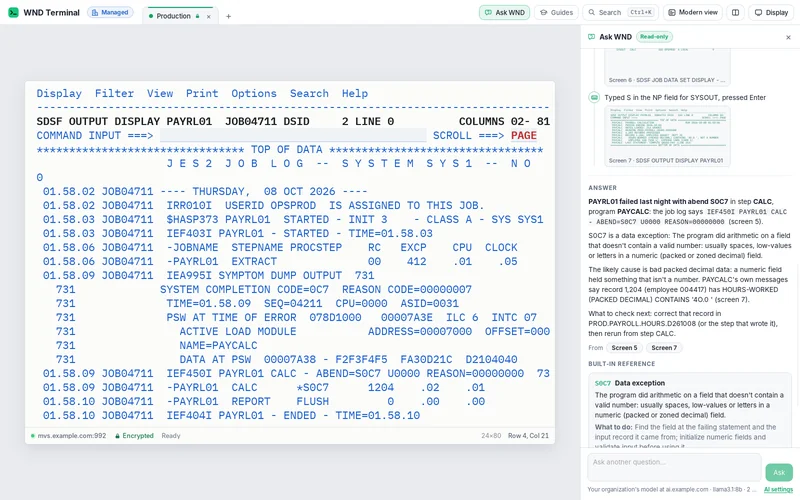
Ask WND combines the terminal screens with your application manuals and procedures. IT chooses the model and documentation source, can require a check with every question, and controls any proposed host changes.
- Explain
- Ctrl+E explains the error in front of you.
- Investigate
- Ask WND reads across the screens needed to answer.
- Connect your agents
- MCP tools for the AI clients your organization already chose.
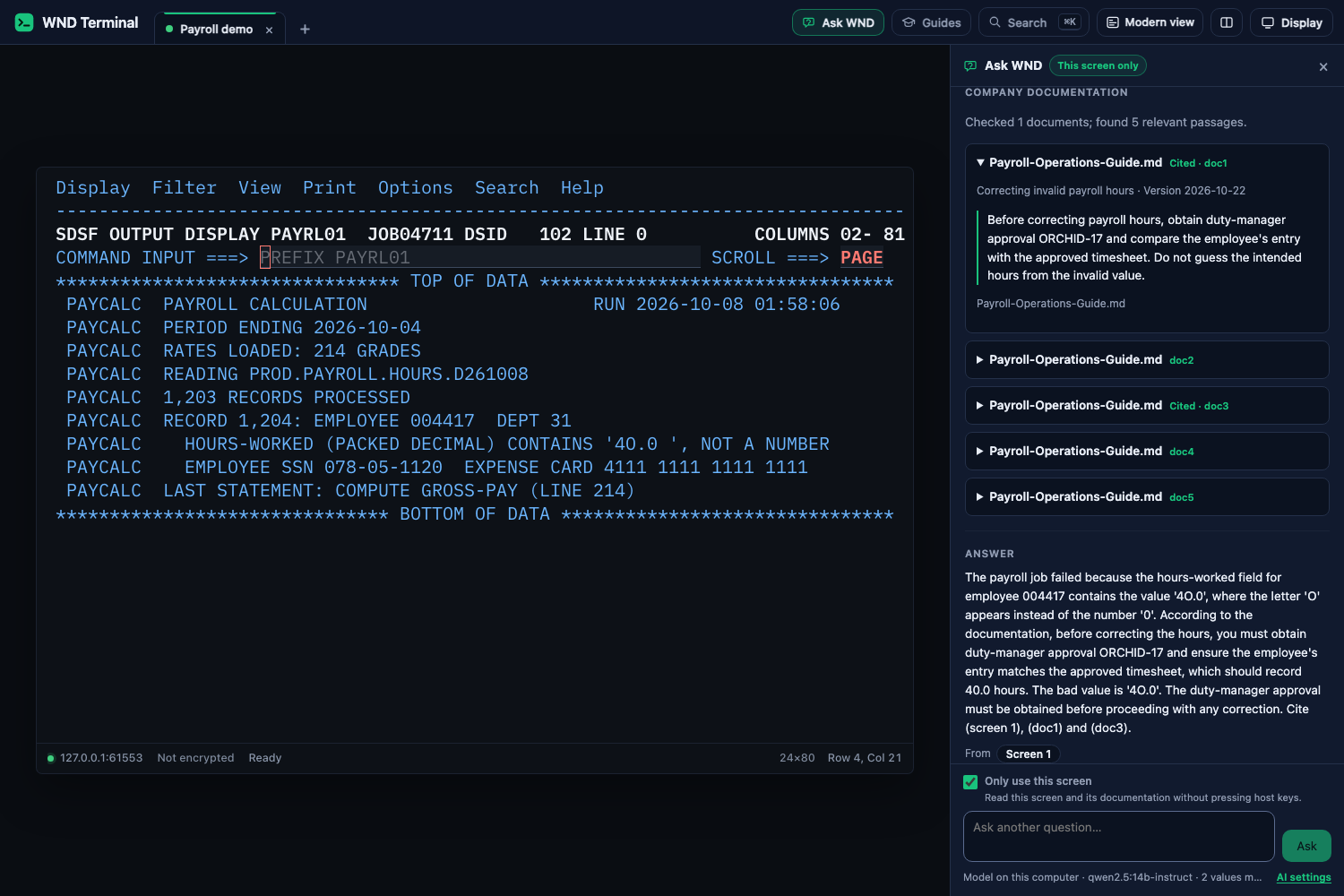
Ask WND using your application's documentation.
Give the AI your operating procedures as well as the screen in front of you.
Connect your documentation
Add application manuals, select an OpenAI document collection, or connect a company search service. Use OpenAI, Claude or a model on your own network for the answer.
Require a check with every question
IT can require WND Terminal to consult the selected documentation before answering. If the source is unavailable or has no relevant guidance, WND Terminal explains what is missing.
Read the source
Open the document passage used in the answer, with its title, version and section or page. Screen evidence stays alongside the company guidance.
Three ways to use AI
Explain the screen
Press Ctrl+E on an error, abend or message. WND Terminal uses the screen and the reference to explain what happened and what to check. Explain this screen.
Ask a question
Press Ctrl+Shift+E and ask why a job failed. WND Terminal shows each screen and key it used, then answers with links to its evidence. Ask WND.
Use your chosen agent
Connect an MCP client to
wnd-mcpon a desktop or your gateway. Publish tested flows as named tools with typed inputs and outputs. AI agent setup and examples.
Your policy holds at every step
On a small screen, swipe the table to read all columns.
| What you need | What WND Terminal provides |
|---|---|
| Model location | Choose a model on the PC, an in-network server or a provider IT approves. Model configuration. |
| Changes to host data | Ask WND is read-only by default. IT can require approval for each proposed change, or turn it off. Unknown actions count as changes. |
| Sensitive fields | Password fields are withheld. Masking replaces sensitive values before they reach the model. Your own MaskPatterns apply. |
| Agent access | AgentConnections, AgentMaxSessions and AgentKeysPerMinute bound access. AllowAgents and AllowAutomation can disable it. |
| Evidence | Question and action events appear in the organization’s audit log without their content. AI security scope. |
Test an agent before production
Use a recording to test the keys and screens an agent follows. In sandbox mode those sessions play recordings rather than connecting to a real host. A wrong key stays on the same screen with an explanation; a recording is an ordered scenario, not an unrestricted mainframe.
Configure the recording sandbox and review your allowed connections and action policy with security before enabling production access.
Fewer tickets at Nationwide
Nationwide cut mainframe service-desk tickets by 40% with explanations from a model hosted inside its network. That result belongs to Explain this screen; Ask WND and MCP agents extend the workflow across screens.
Read Nationwide’s storyHow it is licensed
AI capabilities follow the Desktop or Enterprise license and the policy you deploy. Model hosting and any approved external provider are your organization’s choice. Screen flows as REST APIs are a separately licensed gateway product.
Talk through your deployment or see Desktop and Enterprise pricing.
Questions
Can Ask WND use our own application documentation?
Yes. Add supported documents, select an OpenAI collection or connect an approved company search service. Required mode checks that source before every question; the answer shows the document passages used.
Can we use our existing Claude or OpenAI provider?
Yes. Configure API access for your chosen provider, then choose the documentation source. ChatGPT or Claude project uploads are configured separately from this API connection.
Does AI require a cloud service?
No. IT can choose a local or in-network model. If IT approves an external provider, that provider’s terms and data handling apply.
Are Modern view and Capture all pages AI?
No. Modern view, Capture all pages and Fill from Excel are deterministic product features and do not need a model.
Can an agent change production data?
Read-only is the default. IT can permit approved or allowed changes, with the same action checks and audit controls. Start in the recording sandbox.
Where are the detailed integration examples?
The AI agents page and MCP documentation cover desktop clients, gateway access, tested flows and the shipped examples.
Bring a failed job and your AI policy.
Use the team trial with the model IT approves. In a proof of value, agree which questions, connections and agent actions your team needs.