1. Connect your model
- In WND Terminal, click Ask WND at the top of the window. At the bottom of the Ask WND panel, click AI settings.
- Under Model provider, choose OpenAI API, Claude API, Local model (Ollama), or Company / compatible service.
- Check Server address. The provider choice fills it in for OpenAI, Claude and Ollama. For a company service, enter the API address supplied by IT.
- Enter the exact model name in Model and, if the provider needs one, enter its API key. You can use Find models to look up the available names.
- Click Test model and tools. Check the result before continuing; Ask WND needs a model that supports the tools it uses.
API access is configured separately from a ChatGPT or Claude chat subscription. On a managed desktop or browser gateway, your administrator can set the model for you. If you see Set by your organization, ask your administrator to change it.
2. Add the application documentation
- In the same AI settings window, find Application documentation and click New application.
- Leave Documentation check set to Required for every question.
- In Application name, enter a name such as Payroll.
- Under Documentation source, choose where WND Terminal should look for the manuals. Follow the matching setup below.
Documents on this computer
Click Add a manual and select a text, Markdown or PDF file containing selectable text. Each file can be at most 2 MB. A local pack holds up to 40 documents and 8 MB of extracted text. Expand the imported document, review its extracted text and enter its Version. Repeat for other manuals. This source works with your chosen model, including Claude, OpenAI or Ollama.
OpenAI document collection
Check OpenAI API address and enter a Documentation API key for the account holding the documents. Enter an existing Collection ID, or click Create collection. Use Upload to collection to add manuals, then click Check indexing and wait for completion. The documentation account can differ from the model account.
Company search service
Enter the Company search address, Collection and Documentation API key supplied by IT. Use the service’s base address, such as https://knowledge.company.example. This needs a company service that implements WND Terminal’s documentation-search contract and returns the passages this user is permitted to read.
A model API connection does not inherit files from a ChatGPT Project, custom GPT or Claude Project. Add those approved documents to the source you select here.
3. Save and test the documentation
- In Use for these connection names, enter the exact saved WND Terminal connection names that use this application’s documents, one per line. Leave it blank to apply the profile to all connections. In required mode, a connection outside the configured list cannot skip the requirement.
- In Test question, type a question whose answer is in a manual you just added.
- Click Save and test documentation. Check the result and expand the returned document titles to read the matching passages. A successful model test and a successful documentation test are separate checks.
- Click Save settings to save the model settings and close the window.
Required for every question stops the answer if the source is unavailable, access is denied or no relevant passage is found. The alternative Check every question; allow a screen-only answer if unavailable still checks the source but identifies answers that lack company guidance.
4. Ask and open the source
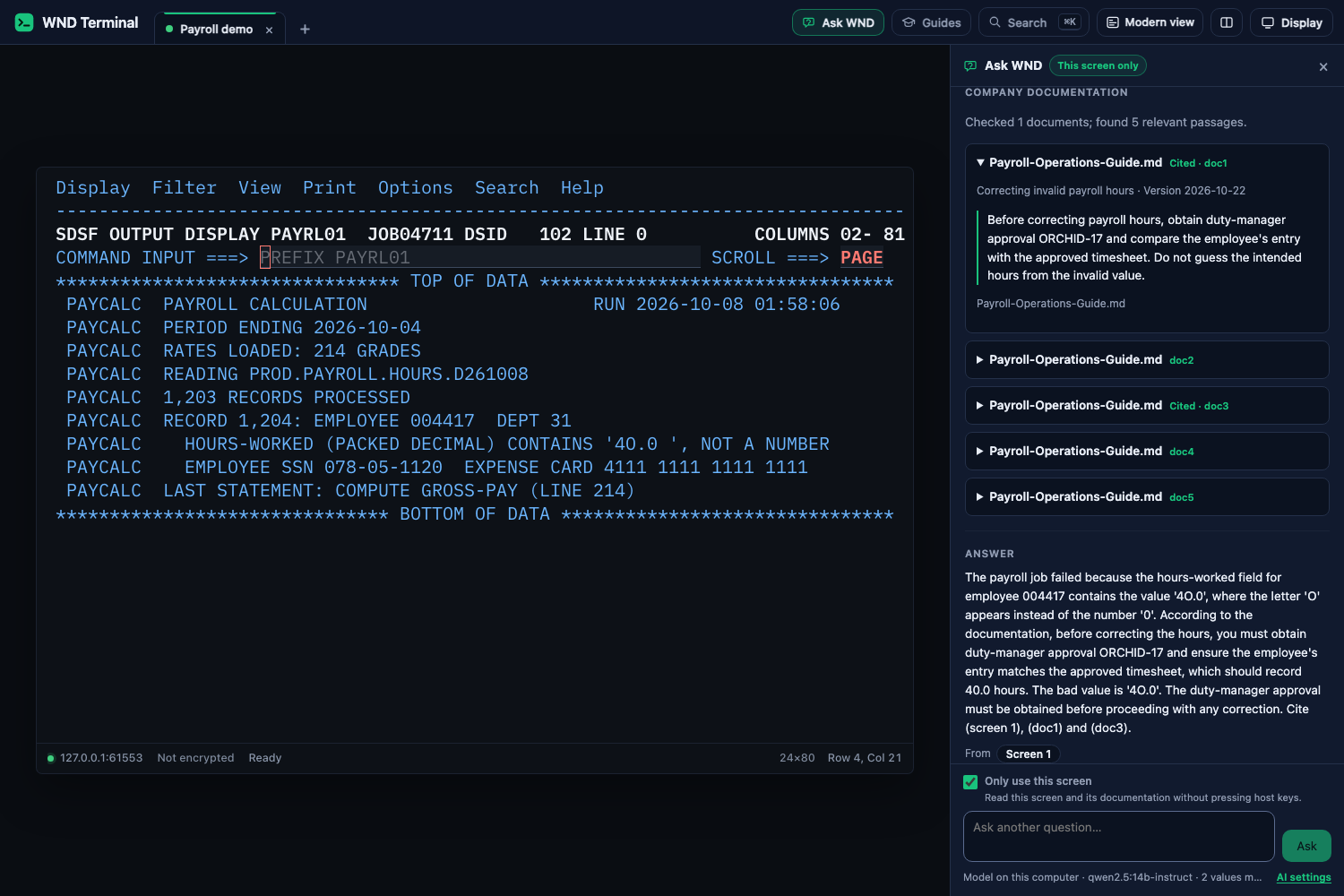
Open the relevant application screen, click Ask WND, and ask your question. To explain the screen already open without navigating, tick Only use this screen before asking. WND Terminal enforces this choice: it can read that screen and the documentation, and cannot press host keys. With the option off, Ask WND can follow the session through other screens under its normal action policy. In the answer panel, find Company documentation and click a document title to read the passage, version and section or page used.
The same source profile applies to Explain this screen. Company guidance is shown separately from screen evidence and the built-in code reference. Read-only and ask-first host controls still apply.
Keep the procedures current
Replace a local manual by importing its updated file, check its version, then save and test again. Remove documents that no longer apply. For an OpenAI collection, update the approved collection and use Check indexing. For a company service, update its source and test the documentation again. Existing answers retain the passages used at the time; new questions use the current source.
Where the data goes
WND Terminal sends the masked question and permitted screen context to the configured documentation service, then supplies selected passages to the chosen model. A local document pack can be used with a local model without a cloud request. Using a cloud model or document collection sends the corresponding content to that provider.
Desktop credentials use the system credential store. Gateway credentials remain on the server. Administrators select the permitted collections and connection scope. Documents are reference content and cannot override host-action policy.
Connecting a company search service
For the team that runs your AI service: WND Terminal needs a search adapter that returns source passages, rather than an answer-only chatbot. Configure a base address and collection in the settings above. WND Terminal posts the masked question and permitted screen context to /wnd-knowledge/v1/search on that service.
{
  "schema_version": 1,
  "collection": "payroll-approved",
  "question": "masked question",
  "screen": "masked permitted screen text",
  "subject": {"user": "authenticated user", "department": null},
  "max_results": 6
}
The adapter must check the authenticated user’s access to the collection and return only permitted passages. Return a versioned receipt with a status and source evidence:
{
  "schema_version": 1,
  "receipt": {
    "status": "matched",
    "profile": "Payroll",
    "revision": "2026-10-22",
    "message": "Checked approved procedures",
    "evidence": [{
      "id": "doc1",
      "document_id": "payroll-guide",
      "title": "Payroll Operations Guide",
      "revision": "2026-10-22",
      "section": "Correction approval",
      "source": "https://docs.company.example/payroll",
      "excerpt": "The exact authorized passage.",
      "hash": "source content hash"
    }]
  }
}
Return at most six passages of at most 2,400 characters each. The status is matched, empty, unavailable, forbidden or stale; matched results need actual evidence. WND Terminal assigns citation IDs to the returned passages and keeps them with the answer. Use HTTPS source links or plain file names. Required mode stops on a missing, denied or stale result.
On the managed gateway, user identity comes from the authenticated session. Use separate permitted collections or user-scoped managed profiles where application access differs. A shared local pack or OpenAI collection does not create access permissions for individual documents. Credentials stay on the gateway. The Admin Kit on the customer downloads page includes the administrator guide, profile schema and reference search adapter.
If setup does not complete
- Model connection: check the API address, account key and exact model name. Use Test model and tools.
- No relevant passage: ask about a fact present in the chosen manual and verify the connection scope.
- PDF has no readable text: supply a text-based version of the manual. Scanned images need text extraction before import.
- Collection still indexing: wait for indexing to finish and check the collection again.
- Set by your organization: ask your administrator to update the managed profile.
Using Ask WND · AI and documentation controls · Request a proof of value